Skip to content

FMRTE 19 for Windows

FMRTE 19 for Windows


FMRTE for Windows

This version of FMRTE was designed to work with FM 19.3.6

Requirements
FMRTE needs Microsoft .NET Framework 4.6.1


Changelog

Build 54

Added

  • Support for FM 19.3.6 game version (32 bits)

Build 53

Added

  • Support for FM 19.3.6 game version

Build 52

Added

  • Support for FM 19.3.5 game version from Xbox/Microsoft store

Build 51

Added

  • Support for FM 19.3.5 game version from Xbox/Microsoft store

Fixed

  • An issue that could prevent FMRTE from loading some managers

Build 50

Fixed

  • An issue that was causing an Error viewing teams with more than 200 players
  • An error when adding columns/rows in MiniFMRTE
  • An issue that could increase the loading time of FMRTE

Build 48

Fixed

  • An issue that was preventing FMRTE from creating new shortlists

Build 47

Added

  • Support for FM 19.3.5 game version from Xbox/Microsoft store
  • Double click on a player in a shortlist will open the player edit page

Build 46

Fixed

  • An issue that caused attributes range to change

Build 45

Fixed

  • Shortlists not being properly loaded

Build 44

Added

  • Support for FM 19.3.5 game version

Build 43

Fixed

  • An issue with the 'Custom Presets' button in Teams Staff list

Build 42

Fixed

  • An issue with Presets that had actions with increment values ('+' or '-')

Build 41

Added

  • Ability to enable / disable a preset in Preset Manager
  • Add new preset categories

Fixed

  • An issue with Preset Manager that was preventing FMRTE from importing old XML preset files properly
  • An issue with the 'Custom Presets' button in Teams Players list

Build 39

Fixed

  • Some UI issues in Preset Manager

Build 38

Added

  • When importing a preset file in the old format (xml) from the Presets folder, FMRTE will now keep a backup of the imported preset.

Fixed

  • A critical issue that was causing FMRTE to crash at startup

Build 37

Added

  • Ability to create presets for some actions like: add injuries to players, register players into UEFA, etc.
  • FMRTE Presets are now stored as json, but xml files are still compatible
  • New staff tendencies

Fixed

  • An issue that caused the game to crash after changing a Nation stadium
  • Some issues with staff tendencies user interface

Build 36

Fixed

  • A minor issue with kits and colors

Build 35

Added

  • Support for FM Touch 19.3.4 game version

Build 34

Added

  • Support for FM 19.3.4 game version

Build 33

Fixed

  • An issue preventing FMRTE from starting

Build 32

Added

  • Support for FM 19.3.3 game version

Build 31

Added

  • Support for FM 19.3.2 game version
  • Support for FM Touch 19.3.1 game version

Build 30

Added

  • Support for FM 19.3.1 game version
  • Missing Club Sponsor types

Fixed

  • Match preparation error

Build 28

Added

  • Support for FM 19.3.0 game version

Build 27

Added

  • Nations relations

Fixed

  • An issue when swapping staff that could cause FMRTE to freeze
  • An issue with favourites menu when human players were managing a nation

Build 26

Added

  • Support for FM 19.2.3 game version

Build 25

Added

  • Support for FM Touch 19.2.2 game version

Build 24

Added

  • Support for FM 19.2.2 game version

Build 23

Fixed

  • An error when changing club sugar daddy
  • Euro Coefficients missing for some european nations
  • Some minor cosmetic issues

Build 22

Fixed

  • An issue with players with staff attributes hair colour
  • An issue with players with staff attributes hair length
  • An error on clubs staff list
  • An issue when changing an affiliation Parent or Feeder club
  • Freezer was not freezing some player staff attributes
  • Some minor cosmetic issues

Build 21

Added

  • Support for FM Touch 19.2.1 game version

Build 20

Added

  • Support for FM 19.2.1 game version

Build 19

Added

  • Support for FM 19.2.0 game version

Fixed

  • Players int caps/goals

Build 18

Added

  • Currency Manager in FMRTE Settings
  • Presets hotkeys
  • FMRTE Rating Settings page

Fixed

  • Reload Screen Info when Switching tabs
  • Nation does not allow dual nationality
  • A bug that caused the Positions column to show numbers instead of positions

Build 17

Added

  • Support for FM Touch 19.1.5 game version

Build 16

Added

  • Support for FM 19.1.5 game version

Build 15

Improved

  • Team players list contract options now applies to all players (previously was applied to selected ones)

Fixed

  • Staff memebers missing from Coach Assigments after using Swap Staff
  • Club players clauses

Build 14

Added

  • Support for FM Touch 19.1.4 game version

Build 13

Fixed

  • An issue that was preventing loading FM Touch

Build 12

Added

  • Support for FM 19.1.4 game version

Build 11

Added

  • Support for FM 19.1.3 game version

Build 10

Added

  • New staff roles into advanced search filter and mass edit
  • New Formed at Club types
  • New Formed at Country types

Improved

  • Both light and dark themes
  • Formed at Club button in player page
  • Formed at Country button in player page

Fixed

  • Player skin color
  • Player hair color
  • Player hair length
  • Club players clauses

Build 9

Added

  • Support for FM 19.1.2 game version

Build 7

Added

  • Ingame shortlists
  • Gamer mental attributes
  • Gamer Options (Become unsackable, allow squad registration ...)

Fixed

  • Agents search results
  • An issue when editing agents that could cause the game to crash
  • An issue that was causing the game to crash after using the 'Move to club' feature
  • An issue that could hang FMRTE when loading game data

Build 6

Added

  • Support for FM 19.1.1 game version
  • New stadium pitch type

Fixed

  • An error when editing stadiums
  • Some nations attributes

Build 5

Added

  • Support for FM 19.1.0 game version
  • Mass Edit Feature
  • Competitions standings
  • Competitions prize money
  • Ability to edit cities
  • Ability to edit weather
  • Ability to edit local regions

Fixed

  • Add/remove nations agreements
  • Add/remove nations treated as EU
  • Add/remove nations treated as non-foreign
  • Backup Manager settings not being saved
  • Stadium extras (is covered, undersoil heating, retractable roof)

Build 4

Added

  • New feature 'Player - Unavailability' that allows you to ban a player, or simply add/remove him from holidays

Updated

  • Some translations

Fixed

  • Error when saving staff
  • Staff coaching license (was not working on some versions)
  • Players appearing as being banned when were on holidays
  • Players unhappiness motives
  • An issue with some gamer attributes

Build 3

Added

  • Support for FM 19.0.3 game version

Fixed

  • Sort by players position
  • Changes in columns order/sort being lost after closing FMRTE
  • Minor UI issues
  • Staff coaching license

Build 2

Added

  • FMRTE now remembers your columns preferences (order and sort)
  • More options in FMRTE Settings (tables columns, change freeze settings, etc)
  • Now you can export your search results to a shortlist

Improved

  • Improved search speed
  • Dark Theme background color on search filter dialog

Fixed

  • An issue that was causing FMRTE to freeze when loading game data
  • An issue that was making players CA/PA not visible for Windows 7 users
  • An issue that was preventing users from changing some relations
  • Export player to CSV

Build 1

Fixed

  • Adding/remove items to favourites not working properly
  • Some an issue that was causing some properties to be half visible
  • Gamers languages were not being properly loaded

Build 0

Added

  • Support for FM 19.0.2 game version

Supported Versions

  • Football Manager 2019 - 19.3.6 (1242975)
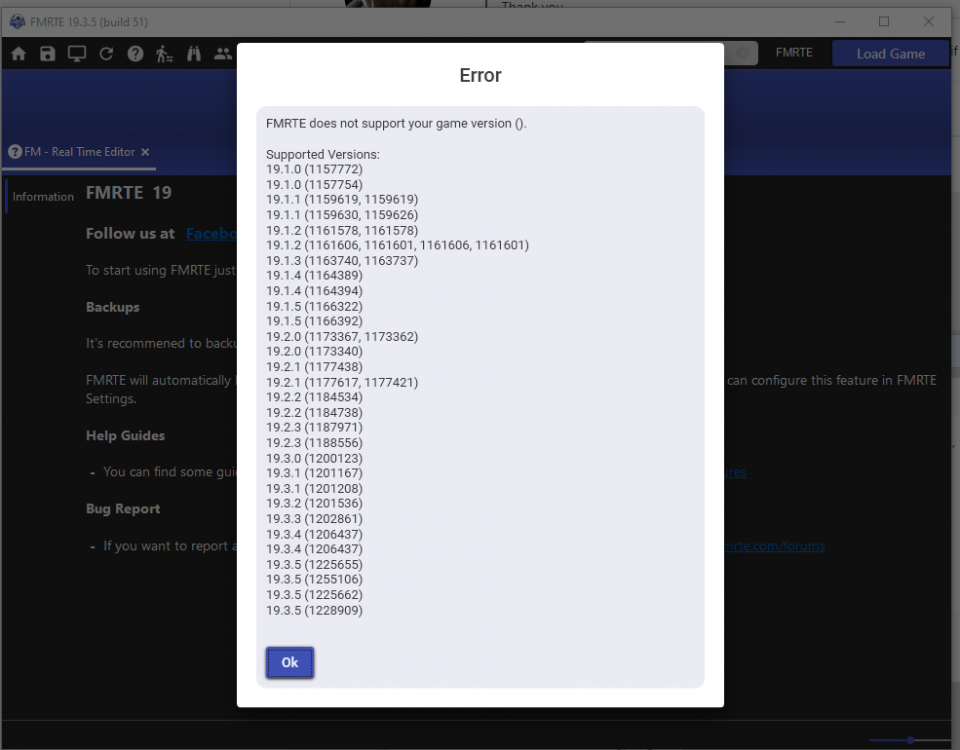
  • Football Manager 2019 - 19.3.5 (1225655, 1228909, 1255106, 1266350)
  • Football Manager 2019 - 19.3.4 (1206437)
  • Football Manager 2019 - 19.3.3 (1202861)
  • Football Manager 2019 - 19.3.2 (1201536)
  • Football Manager 2019 - 19.3.1 (1201167)
  • Football Manager 2019 - 19.3.0 (1200123)
  • Football Manager 2019 - 19.2.3 (1187971)
  • Football Manager 2019 - 19.2.2 (1184534)
  • Football Manager 2019 - 19.2.1 (1177438)
  • Football Manager 2019 - 19.2.0 (1173367, 1173362)
  • Football Manager 2019 - 19.1.5 (1166322)
  • Football Manager 2019 - 19.1.4 (1164389)
  • Football Manager 2019 - 19.1.3 (1163740, 1163737)
  • Football Manager 2019 - 19.1.2 (1161578)
  • Football Manager 2019 - 19.1.1 (1159619)
  • Football Manager 2019 - 19.1.0 (1157770, 1157772)
  • Football Manager Touch 2019 - 19.3.5 (1225662)
  • Football Manager Touch 2019 - 19.3.4 (1206437)
  • Football Manager Touch 2019 - 19.3.1 (1201208)
  • Football Manager Touch 2019 - 19.2.3 (1188556)
  • Football Manager Touch 2019 - 19.2.2 (1184738)
  • Football Manager Touch 2019 - 19.2.1 (1177617, 1177421)
  • Football Manager Touch 2019 - 19.2.0 (1173340)
  • Football Manager Touch 2019 - 19.1.5 (1166392)
  • Football Manager Touch 2019 - 19.1.4 (1164394)
  • Football Manager Touch 2019 - 19.1.2 (1161606, 1161601)
  • Football Manager Touch 2019 - 19.1.1 (1159630, 1159626)
  • Football Manager Touch 2019 - 19.1.0 (1157754)

  • Submitter
  • Submitted
    10/21/2018
  • Category


  • Replies 445
  • Views 253.8k
  • Created
  • Last Reply

Top Posters In This Topic

Most Popular Posts

  • FMRTE 19.2.3 (Build 26) - RELEASED Download: FMRTE Auto-update or https://www.fmrte.com/download/fmrte19 Added Support for FM 19.2.3 game version

  • FMRTE 19.2.0 (Build 1) - RELEASED Download: FMRTE Auto Update or https://www.fmrte.com/download/fmrte19 Fixed Adding/remove items to favourites not working properly Some an issu

  • FMRTE 19.1.1 (Build 6) - Released Download: Auto-update or https://www.fmrte.com/download/fmrte19 Added Support for FM 19.1.1 game version New stadium pitch type Fixed
Posted Images

Featured Replies

I cannot use my custom preset after this update. Whenever I try to apply presets, it says unexpected error occur. 

  • Author
1 hour ago, vd d said:

I cannot use my custom preset after this update. Whenever I try to apply presets, it says unexpected error occur. 

Please submit a bug report in our bug tracker (https://www.fmrte.com/forums/forum/15-windows/)


If possible, include your Preset file so that I can try to replicate the issue

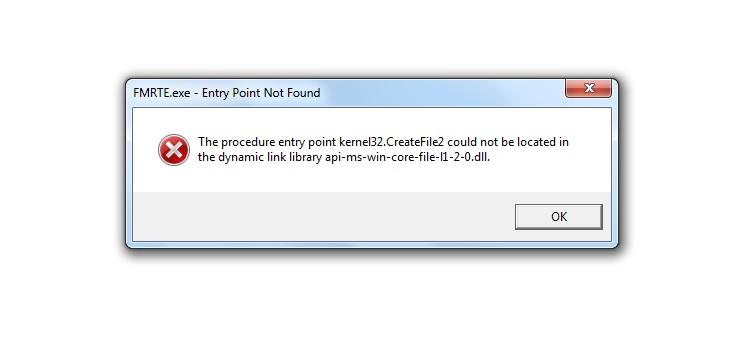
Was working fine before I updated. After I updated it only pop outs the  "FMRTE 19 has stopped working" notification. The worse is this happened right after I paid for it. I finally decided to pay for it and then the update prompt comes up, so I updated it and yeah, can't use it anymore.

23 minutes ago, dasty90 said:

Was working fine before I updated. After I updated it only pop outs the  "FMRTE 19 has stopped working" notification. The worse is this happened right after I paid for it. I finally decided to pay for it and then the update prompt comes up, so I updated it and yeah, can't use it anymore.


If you are using build 37 which I presume you are, then it has been reported as non working.  The developers are aware of it and will release a fix asap.


https://www.fmrte.com/forums/topic/8005-19-won039t-load-won039t-start/

While fixing the issue can you guys give us to build 36 download mirror/option?I mean it was perfectly working for me so I would love to revert back to that build.

23 minutes ago, comolokko said:

While fixing the issue can you guys give us to build 36 download mirror/option?I mean it was perfectly working for me so I would love to revert back to that build.


No need as the build should be out today.  The bug is a major one so I am sure the developers will want to fix it urgently.

  • Author

If anyone needs to rollback, to download a previous version:

  • Go to downloads page (https://www.fmrte.com/download/fmrte19)
  • In the bottom of the page, select the 'See changelog' and choose the previous version
  • Then press the Download button (see the image)

image.png


In the meantime, please read this topic and provide any information that you can, so that we can release a fix soon.


Edited by BraCa
fixed link

  • Author
10 minutes ago, vldmr-sus said:

Can't use old staff presets after the update. After clicking the button nothing shows up.

Please report it in this topic https://www.fmrte.com/forums/topic/8006-19-custom-preset-doesn039t-work/


Also, the latest update (build 37) included several changes in Preset Manager (most of them are not visible yet).

The major change, is that Preset files are now json instead of xml. 

When FMRTE starts, it will convert any preset in xml format, to json, and load them properly (in the next build, it will keep a backup of the xml file just in case)

2 minutes ago, BraCa said:

Please report it in this topic https://www.fmrte.com/forums/topic/7481-fmrte-19-for-windows/page/17/?tab=comments#comment-42029


Also, the latest update (build 37) included several changes in Preset Manager (most of them are not visible yet).

The major change, is that Preset files are now json instead of xml. 

When FMRTE starts, it will convert any preset in xml format, to json, and load them properly (in the next build, it will keep a backup of the xml file just in case)

The link leads to my own commentary. I suppose I should post in the bug tracker?

Players presets work fine though

Hi! 

When you export a player, there are only 47 Prefered Moves in the pxml file, although in the FMRTE there are 58.

Could you fix it, please?

Thanks!!

  • Author

FMRTE 19.3.4 (Build 39) - RELEASED

 Download: FMRTE Auto-update or https://www.fmrte.com/download/fmrte19

Changelog

Added

  • When importing a preset file in the old format (xml) from the Presets folder, FMRTE will now keep a backup of the imported preset.

Fixed

  • Some UI issues in Preset Manager
  • A critical issue that was causing FMRTE to crash at startup
  • Author

FMRTE 19.3.4 (Build 43) - RELEASED

 Download: FMRTE Auto-update or https://www.fmrte.com/download/fmrte19

Changelog

Fixed

  • An issue with the 'Custom Presets' button in Teams Staff list
  • An issue with Presets that had actions with increment values ('+' or '-')

Edited by BraCa
updated for build 43

On 5/23/2019 at 11:12 AM, Caesar Henry said:

could not activate it. It says that" unknown error 'NameResolutionFailure'

WeChat Image_20190523201223.png


Read the Licenses section in the forum rules.

  • 2 weeks later...

SI released new update to 19.3.5, I am sure BraCa and others are currently working on this 👍

Join the conversation

You can post now and register later. If you have an account, sign in now to post with your account.
Note: Your post will require moderator approval before it will be visible.

Guest
Reply to this topic...

Account

Navigation

Search

Search

Configure browser push notifications

Chrome (Android)
  1. Tap the lock icon next to the address bar.
  2. Tap Permissions → Notifications.
  3. Adjust your preference.
Chrome (Desktop)
  1. Click the padlock icon in the address bar.
  2. Select Site settings.
  3. Find Notifications and adjust your preference.