Skip to content

FMRTE 18 for Windows

FMRTE 18 for Windows


FMRTE for Windows

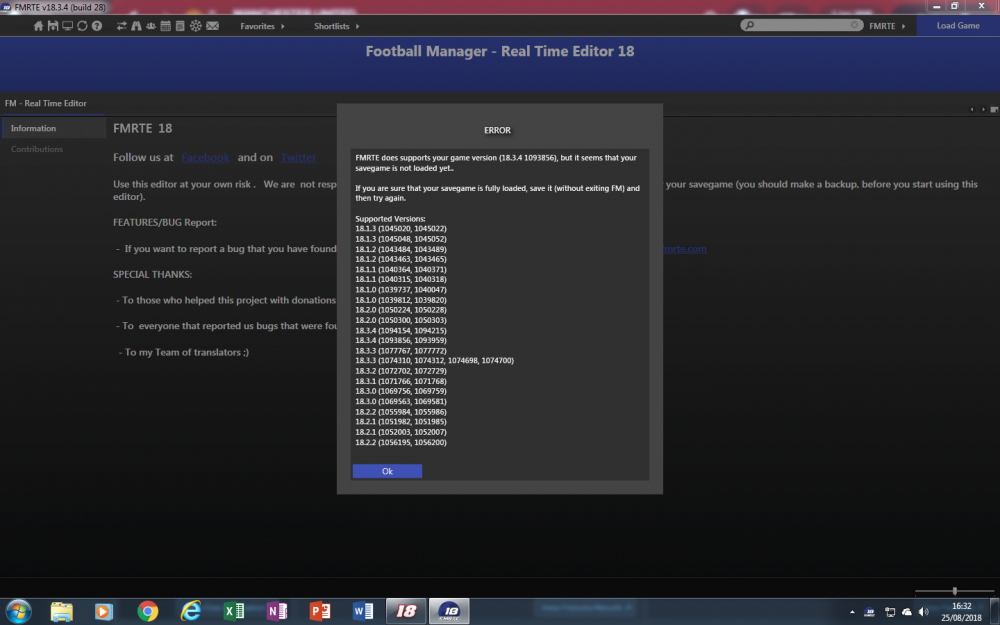
This version of FMRTE was designed to work with FM 18.3.4

Requirements
FMRTE needs Microsoft .NET Framework 4.6

Steam auto update STEAM automatically updates the game when a new patch is released.

While it's advisable to keep the game updated, you should know that every time the game is updated it makes FMRTE useless, meaning that it also needs to be updated.

So if you want to keep using FMRTE, you SHOULD use STEAM in OFFLINE mode, or do a full backup of the folder of the game, so you can restore it later.

This is to prevent the game from being updated automatically as we cannot GUARANTEE that we will be able to update FMRTE to make it work with a future game patch.


Changelog

Build 28

Added

  • Support for FM Touch 18.3.4 game version

Build 27

Added

  • Support for FM 18.3.4 game version

Build 26

Added

  • Support for FM Touch 18.3.3 game version

Build 25

Added

  • Support for FM 18.3.3 game version

Build 24

Added

  • Support for FM 18.3.2 game version

Build 23

Added

  • Support for FM 18.3.1 game version

Build 22

Added

  • Support for FM Touch 18.3.0 game version

Build 21

Added

  • Support for FM 18.3.0 game version

Fixed

  • Gamers not being loaded when CA or PA is outside of the 1 to 200 range
  • Loan Contracts Agreed Price and Monthly Fee

Build 20

Fixed

  • Missing players with staff attributes from Teams player list

Build 19

Fixed

  • An issue with 'Move to Club' feature that was causing some players to be on two teams at the same time

Build 18

Added

  • Support for FM 18.2.2 game version

Build 17

Added

  • Support for FM 18.2.1 game version

Build 16

Added

  • Support for FM 18.2.0 game version

Build 15

Fixed

  • An error when loading some shortlist files

Build 14

Added

  • 5-2-3 WB Tactic

Fixed

  • Officials not being loaded properly

Build 12

Added

  • Club filter in Freeze Manager
  • Ability to change players hair length

Fixed

  • Players skin color

Improved

  • Settings to manage attributes to ignore for frozen players or staff

Build 11

Added

  • Support for FM 18.1.3 game version

Build 10

Added

  • Support for FM 18.1.2 game version
  • 'Will Leave at the end of Contract' contract clause

Build 9

Added

  • Support for FM 18.1.1 game version
  • New Staff Roles
  • New Staff attributes
  • New Sugar Daddy type

Fixed

  • Clubs Wage contributions

Build 8

Added

  • Support for FM 18.1.0 game version

Removed

  • Support for FM 18 Beta

Build 7

Added

  • Support for FM 18.0.3 game version

Build 6

Fixed

  • Clubs Match Preparation not working properly in some teams

Build 5

Added

  • Current Screen
  • Clubs Match Preparation

Build 4

Added

  • Support for other FM 18.0.1 game versions
  • Support for other FM 18.0.2 game versions
  • Support for FM Touch 18.0.2 game version

Build 3

Added

  • Support for FM 18.0.2 game version

Fixed

  • Crash when using mass edit to change clubs JuniorCoaching or YouthRecruitment

Build 2

Added

  • Ability to edit persons names
  • Ability to move a player from one club to another
  • Ability to edit future transfers
  • Ability to edit players bonus and clauses
  • Ability to swap players
  • Ability to swap staff
  • Ability to add affiliations
  • Ability to add injuries
  • Ability to add staff knowledge

Fixed

  • Crash when editing gamer profile
  • Popup message when saving changes for a player or staff

Build 1

Added

  • Support for FM Touch 18.0.1 game version

Build 0

Added

  • Support for FM 18.0.1 game version

Supported Versions

  • Football Manager 2018 - 18.3.4 (1093856, 1093959)
  • Football Manager 2018 - 18.3.3 (1074310, 1074312, 1074698, 1074700)
  • Football Manager 2018 - 18.3.2 (1072702, 1072729)
  • Football Manager 2018 - 18.3.1 (1071766, 1071768)
  • Football Manager 2018 - 18.3.0 (1069563, 1069581)
  • Football Manager 2018 - 18.2.2 (1055984, 1055986)
  • Football Manager 2018 - 18.2.1 (1051982, 1051985)
  • Football Manager 2018 - 18.2.0 (1050224, 1050228)
  • Football Manager 2018 - 18.1.3 (1045020, 1045022)
  • Football Manager 2018 - 18.1.2 (1043463, 1043465)
  • Football Manager 2018 - 18.1.1 (1040315, 1040318)
  • Football Manager 2018 - 18.1.0 (1039737, 1040047)
  • Football Manager Touch 2018 - 18.3.4 (1094154, 1094215)
  • Football Manager Touch 2018 - 18.3.3 (1077767, 1077772)
  • Football Manager Touch 2018 - 18.3.0 (1069756, 1069759)
  • Football Manager Touch 2018 - 18.2.2 (1056195, 1056200)
  • Football Manager Touch 2018 - 18.2.1 (1052003, 1052007)
  • Football Manager Touch 2018 - 18.2.0 (1050300, 1050303)
  • Football Manager Touch 2018 - 18.1.3 (1045048, 1045052)
  • Football Manager Touch 2018 - 18.1.2 (1043484, 1043489)
  • Football Manager Touch 2018 - 18.1.1 (1040364, 1040371)
  • Football Manager Touch 2018 - 18.1.0 (1039812, 1039820)


  • Replies 270
  • Views 131.9k
  • Created
  • Last Reply

Top Posters In This Topic

Most Popular Posts

  • Update will be released in a few minutes

  • SI have released an update 18.3.4 we are aware of this the new version of FMRTE will be released ASAP!   Meanwhile if possible avoid using steam in online mode to avoid the update so you can

  • FMRTE 18.1.2 (Build 10) - Released Download: FMRTE Auto-Update or http://www.fmrte.com/download/fmrte18 Changelog Added Support for FM 18.1.2 game version 'Will Leave at th
Posted Images

Featured Replies

Hi, there is a limit on the number of staff I can set, with the editor.  Is this a known issue?


I can only set coaches allowed to max 18 for the first team.


10 hours ago, anthony.rowell said:

Hi, there is a limit on the number of staff I can set, with the editor.  Is this a known issue?


I can only set coaches allowed to max 18 for the first team.


Interesting.

Hello,

I can't set my coach's PA. After saving the PA with the editor, in game still the same PA.

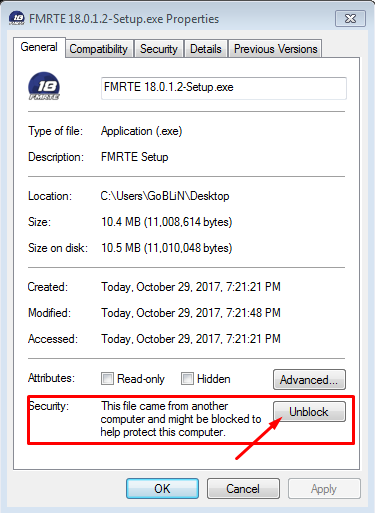
Ive got an issue where my PC is a bit messed up and I cant do much with the settings.  As a result, any time I try to download a file where it doesn't like the certification or anything like that, even when I tell it to ignore it I just end up with an exe file that wont execute.  Is there a different way I can get this program packaged at all?  Tried saving it as a zip file and then turning it back to an exe but that didn't work.

1 hour ago, Ian Heath said:

Ive got an issue where my PC is a bit messed up and I cant do much with the settings.  As a result, any time I try to download a file where it doesn't like the certification or anything like that, even when I tell it to ignore it I just end up with an exe file that wont execute.  Is there a different way I can get this program packaged at all?  Tried saving it as a zip file and then turning it back to an exe but that didn't work.


Have you tried unblocking the installer in the Properties window? Either untick the tickbox or click unblock.  If that does not work, let me know and I will package it for you and send you the dl link.

8 hours ago, Ian Heath said:

Thanks, I cant believe it was as simple as that.  Never noticed that in properties before.


No problem :)

every time FM18 updates, fmrte asks me to put in my license info. Now it says ...


You reached the maximum number of activations for your license key. Request more activations in your Client Area.


Can someone please help me?

9 minutes ago, BestManagerEver said:

every time FM18 updates, fmrte asks me to put in my license info. Now it says ...


You reached the maximum number of activations for your license key. Request more activations in your Client Area.


Can someone please help me?

Request via your client area 

Read forum rules Licensing section


http://www.fmrte.com/forums/forum/111-forum-rules/

On 06/03/2018 at 1:00 AM, culturedleftfoot said:

Request via your client area 

Read forum rules Licensing section


there is no option to request more.


Nothing to click on.


On 22-2-2018 at 12:34 PM, GREYFOX said:


I am assuming you are using the Windows build.  The skin might be the issue.  Have you tried the default skin? Try restarting both your system and the software.


Default skin also doesn't work. Software uninstalled and pc restarted. Still nothing.

5 hours ago, Jacco4444 said:


Default skin also doesn't work. Software uninstalled and pc restarted. Still nothing.

 try Clearing cache-  via your user AppData in Windows C:\Users\ YOUR USER DETAILS HERE  \AppData\Roaming     and find FMRTE file.


NB clearing the cache can result in your preferences being reset to default so back up those settings prior to trying this. Also make a note of your FMRTE license(details can be found in your client area) should you have to enter it again. 


12 hours ago, culturedleftfoot said:

 try Clearing cache-  via your user AppData in Windows C:\Users\ YOUR USER DETAILS HERE  \AppData\Roaming     and find FMRTE file.


NB clearing the cache can result in your preferences being reset to default so back up those settings prior to trying this. Also make a note of your FMRTE license(details can be found in your client area) should you have to enter it again. 


Thanks, but I can't find the AppData folder in Users. I just see my docs, my images etc. Also I can't change my language on this shitty PC so I think screenshots won't help really as I'm Dutch.


Thanks for helping, though.

31 minutes ago, Jacco4444 said:


Thanks, but I can't find the AppData folder in Users. I just see my docs, my images etc. Also I can't change my language on this shitty PC so I think screenshots won't help really as I'm Dutch.


Thanks for helping, though.

Your app data must be hidden

Google how to set it unhidden for your system

21 minutes ago, culturedleftfoot said:

Your app data must be hidden

Google how to set it unhidden for your system


Genius, got it. So do I just delete these files or?


c79ab26c1e0f61936d62b7fbd6fb4a07.png

thanks for update BraCa Sir!!


FMRTE leading the way as always, beating the game and enjoying top class football action with nice gaming engine <3

On 4.3.2018 at 8:39 PM, Davide.G said:

Hello,

I can't set my coach's PA. After saving the PA with the editor, in game still the same PA.

Fix it by running FMRTE 18 as an admin.

Join the conversation

You can post now and register later. If you have an account, sign in now to post with your account.
Note: Your post will require moderator approval before it will be visible.

Guest
Reply to this topic...

Account

Navigation

Search

Search

Configure browser push notifications

Chrome (Android)
  1. Tap the lock icon next to the address bar.
  2. Tap Permissions → Notifications.
  3. Adjust your preference.
Chrome (Desktop)
  1. Click the padlock icon in the address bar.
  2. Select Site settings.
  3. Find Notifications and adjust your preference.