Skip to content

FMRTE 17 for Windows

FMRTE 17 for Windows


FMRTE for Windows

This version of FMRTE was designed to work with FM 17.3.2

Requirements
FMRTE needs Microsoft .NET Framework 4.6

Steam auto update STEAM automatically updates the game when a new patch is released.

While it's advisable to keep the game updated, you should know that every time the game is updated it makes FMRTE useless, meaning that it also needs to be updated.

So if you want to keep using FMRTE, you SHOULD use STEAM in OFFLINE mode, or do a full backup of the folder of the game, so you can restore it later.

This is to prevent the game from being updated automatically as we cannot GUARANTEE that we will be able to update FMRTE to make it work with a future game patch.


Changelog

Build 23

Fixed

  • Crash when using mass edit to change clubs JuniorCoaching or YouthRecruitment

Build 22

Fixed

  • Loading game data issues

Build 21

Added

  • Support for 17.3.2 game version

Fixed

  • Clubs Balance not being exchanged to other currencies
  • Euro and Dollar exchange rates to match the game (you must restore FMRTE settings to those changes have an effect)

Build 19

Fixed

  • Stadium Covered, Retractable roof and have undersoil heating toggles
  • Filter staff by personality attributes

Build 18

Added

  • Support for 17.3.1 Touch game version

Build 17

Added

  • Support for 17.3.1 game version

Build 16

Added

  • Support for 17.3.0 Touch game version

Fixed

  • Inaccurate injury days when adding a new player injury
  • Some minor issues

Build 15

Added

  • Support for 17.3.0 game version

Fixed

  • Error when sorting by dates
  • Editing player staff future transfer

Build 14

Added

  • Support for 17.2.1 game version

Build 10

Added

  • Support for 17.2.0 Touch game version

Build 9

Added

  • Support for 17.2.0 game version

Build 8

Added

  • Ability to add/remove nations agreements (you can remove brexit)
  • Nations generated players settings
  • Nations Max Youth Age.
  • Nations does not allow dual nationality setting
  • Person names can now be edited without being limited to the previous name length

Fixed

  • Competitions reputation setted to '0' when saving competition changes
  • Players and staff not being loaded in some rare cases

Build 6

Added

  • Support for 17.1.2 Touch

Fixed

  • Some players not being loaded
  • Stadiums locations

Build 5

Added

  • Support for 17.1.2 game version
  • Players contract signed date

Fixed

  • Wonderkid search filter

Build 4

Added

  • Some missing staff job types
  • Support for Touch game version
  • Ability to move players from one club to another
  • Nations match preparation

Fixed

  • Contract happiness value
  • Inspire Team preset was making players unavailable for Cup games
  • Unable to load shortlist in FM17
  • Staff gender
  • Nations Agreements
  • Nations treated as UE
  • Presets not being applied when player CA/PA was higher than normal (for ex 201)

Build 3

Fixed

  • FMRTE crash when loading game data (we had to disable FMRTE Mobile but it should be re-enabled in a future release)
  • Disabled Nations Agreements, and NationsTreatedAsUE until we have a propper fix

Build 1

Added

  • Support for 17.1.1 game version

Supported Versions

  • Football Manager 2017 - 17.3.2 (970983, 970986)
  • Football Manager 2017 - 17.3.1 (939048, 939053)
  • Football Manager 2017 - 17.3.0 (936783, 936785)
  • Football Manager 2017 - 17.2.1 (919512, 919515)
  • Football Manager 2017 - 17.2.0 (914093, 914095)
  • Football Manager 2017 - 17.1.2 (903032, 903050)
  • Football Manager 2017 - 17.1.1 (899420, 899422)
  • Football Manager Touch 2017 - 17.3.2 (971128, 971130)
  • Football Manager Touch 2017 - 17.3.1 (952425, 952427)
  • Football Manager Touch 2017 - 17.3.0 (936814, 936828)
  • Football Manager Touch 2017 - 17.2.0 (914147, 914157)
  • Football Manager Touch 2017 - 17.1.2 (904490, 904492)
  • Football Manager Touch 2017 - 17.1.1 (899536, 899534)


  • Replies 460
  • Views 176.2k
  • Created
  • Last Reply

Top Posters In This Topic

Most Popular Posts

  • FMRTE 17.3.2 (Build 21) - Released Download: FMRTE Auto-update or http://www.fmrte.com/download/fmrte17 Changelog Added Support for 17.3.2 game version Fixed Clubs Bala

  • FMRTE 17.3.1 (Build 17) - Released Download: FMRTE Auto-update or http://www.fmrte.com/download/fmrte17 Changelog Added Support for 17.3.1 game version

  • Blanchflower
    Blanchflower

    Just to let you guys know, Si has updated Football Manager Touch 2017  version and FMRTE does not work with the latest version of Football Manager Touch 2017.

Posted Images

Featured Replies

Just now, arijit said:

I just started my long term save. Thanks Braca. Bought, installed and tested. Mine is working fine. 

Just noticed one thing, this years license key starts with FM16. It gave me a heart attack after purchase, did I buy it for FMRTE16 again? But license worked fine in FMRTE17. Thanks.

It is like that every year actually, last years started with 15 and 15's started with 14 etc. A quirky thing I noticed.

Hey Braca, thanks for such a quick release, and a reasonable price as always.


I'm having a bit of trouble importing shortlists from the editor to the game.


At the start it's because the shortlists were saving into my fm16 folder, but once that was rectified it says in game that the file can not be imported.

1 minute ago, tieio said:

It is like that every year actually, last years started with 15 and 15's started with 14 etc. A quirky thing I noticed.

Strange, mine client area shows different. Last 3 version license keys all started with respective year. This isn't something big and not complaining, just found odd because I knew mine keys always started year-wise.

4 minutes ago, aworkingclasshero said:
Hey Braca, thanks for such a quick release, and a reasonable price as always.
 
I'm having a bit of trouble importing shortlists from the editor to the game.
 
At the start it's because the shortlists were saving into my fm16 folder, but once that was rectified it says in game that the file can not be imported.


Shortlists are not working at the moment this will be addressed in a future version [emoji3]


2 minutes ago, jd8899 said:

hi silly question forgot how to put stean from auto updating does anyone know how to make it go offline permantly

Open Steam UI. Top left menu "Steam" > "go offline"

2 hours ago, arijit said:

Strange, mine client area shows different. Last 3 version license keys all started with respective year. This isn't something big and not complaining, just found odd because I knew mine keys always started year-wise.

mine always start with the previous years year for some reason so its normal/doesnt matter it works 

for FMRTE16 it started FMR15

FMRTE15 it was FMR14 etc etc

1 hour ago, alper güven_34672 said:

hello is there gonna be a discount for old users

Yeah, I bet if you show your ID and you are over 80 he might give a discount.

for me does not work it show's me always this note that the windows stop the application cause does not work prperly

i have 4.6 fremework w10 new pc and 17.1.1 on my fm17 i do not use the fm touch please help

this happen was try to load the game

and my game has this supported by your tool version 

  • Football Manager 2017 - 17.1.1.899420

Is it still possible to freeze staff attributes by putting 2000 points in ca/pa? Or is there a better method?

Great work as ever Braca and the team. But I have encountered a slight issue.

I usually have 2 saves on the go, one with my own team (Man Utd) and another with another team.


FMRTE works fine on the Man Utd save, but try the other one and it tells me my saved game isn't loaded, even though it is. Anyone have any ideas?

  • Author
1 minute ago, JKisthe1 said:

Great work as ever Braca and the team. But I have encountered a slight issue.

I usually have 2 saves on the go, one with my own team (Man Utd) and another with another team.


FMRTE works fine on the Man Utd save, but try the other one and it tells me my saved game isn't loaded, even though it is. Anyone have any ideas?

Can you try this:

  • Close FM 17
  • Reopen FM 17
  • Open the savegame FMRTE does not recognize
  • See if FMRTE works

Let me know if it worked

Hey guys, I already bought my FMRTE licence, and now I started to play!

I have one issue/question.

Even if I max out Match Preparation and overall familiarity levels are max like you see below in familiarity1 picture , even so, in individual familiarity level of players it is low. See for example the famil2 picture and the same or worst it is for every player. Is there any way to modify this with FMRTE (I tried both fmrte and ingame editor but they only max the dark bar and the light one stays low).

Thank you in advance guys.

Overall Familiarity:

familiarity1.jpg

Individual Player Familiarity:

famil2.jpg

  • Author
11 minutes ago, daffynash said:

Hey guys, I already bought my FMRTE licence, and now I started to play!

I have one issue/question.

Even if I max out Match Preparation and overall familiarity levels are max like you see below in familiarity1 picture , even so, in individual familiarity level of players it is low. See for example the famil2 picture and the same or worst it is for every player. Is there any way to modify this with FMRTE (I tried both fmrte and ingame editor but they only max the dark bar and the light one stays low).

Thank you in advance guys.

Overall Familiarity:

familiarity1.jpg

Individual Player Familiarity:

famil2.jpg

Thanks for reporting it, currently FMRTE only supports teams Familiarity, not individual players, but that's the kind of feature that we might add in a future release :)

37 minutes ago, daffynash said:

Hey guys, I already bought my FMRTE licence, and now I started to play!

I have one issue/question.

Even if I max out Match Preparation and overall familiarity levels are max like you see below in familiarity1 picture , even so, in individual familiarity level of players it is low. See for example the famil2 picture and the same or worst it is for every player. Is there any way to modify this with FMRTE (I tried both fmrte and ingame editor but they only max the dark bar and the light one stays low).

Thank you in advance guys.

Overall Familiarity:

familiarity1.jpg

Individual Player Familiarity:

famil2.jpg

:huh: Nice, a new feature in FM and possibly FMRTE.  I can't wait to play FM 17.

2 minutes ago, terry bennett said:

will this work on my macbook?

It will eventually.

I have brought the licence and downloaded the programme but when comming to activate it it sayes the programme needs to be updated and when i press the update it just goes round and round  and then sayes server timed out and if i try to activate it without the update it again just goes round and round untill server timed out again please help i love your work and have had all the versions before this is the first problem i have ever encountered

Hi Everyone,

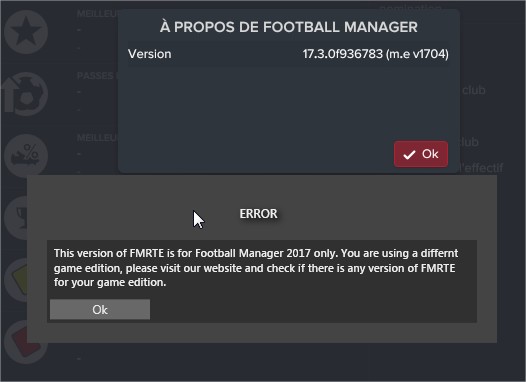
I get the same error version message.

My version: FMRTE does not support your game version (17.1.1 899534).

6 minutes ago, jamespaterson67 said:

I have brought the licence and downloaded the programme but when comming to activate it it sayes the programme needs to be updated and when i press the update it just goes round and round  and then sayes server timed out and if i try to activate it without the update it again just goes round and round untill server timed out again please help i love your work and have had all the versions before this is the first problem i have ever encountered

Hi james it seems your firewall is blocking FMRTE, ether allow FMRTE trough your Firewall or try our offline activation system http://www.fmrte.com/offlineactivation

Join the conversation

You can post now and register later. If you have an account, sign in now to post with your account.
Note: Your post will require moderator approval before it will be visible.

Guest
Reply to this topic...

Account

Navigation

Search

Search

Configure browser push notifications

Chrome (Android)
  1. Tap the lock icon next to the address bar.
  2. Tap Permissions → Notifications.
  3. Adjust your preference.
Chrome (Desktop)
  1. Click the padlock icon in the address bar.
  2. Select Site settings.
  3. Find Notifications and adjust your preference.