Skip to content

FMRTE 16 for Windows

FMRTE 16 for Windows


FMRTE for Windows

This version of FMRTE was designed to work with FM 16.3.2

Requirements
FMRTE needs Microsoft .NET Framework 4.6

Steam auto update STEAM automatically updates the game when a new patch is released.

While it's advisable to keep the game updated, you should know that every time the game is updated it makes FMRTE useless, meaning that it also needs to be updated.

So if you want to keep using FMRTE, you SHOULD use STEAM in OFFLINE mode, or do a full backup of the folder of the game, so you can restore it later.

This is to prevent the game from being updated automatically as we cannot GUARANTEE that we will be able to update FMRTE to make it work with a future game patch.


Changelog

Build 39

Fixed

  • A rare activation issue

Build 38

Fixed

  • Error cloning a player
  • Issue when removing affiliations benefits

Build 37

Added

  • Support for FM 16.3.2 game version

Build 36

Fixed

  • Fixed some columns sorting errors

Build 35

Fixed

  • Some rare issues on loading game data
  • Fixed some columns sorting errors

Build 34

Fixed

  • An issue that was preventing FMRTE from save changes

Build 33

Added

  • Referees
  • Players Competition Bonuses
  • Players Loyalty Bonus

Fixed

  • An issue that was preventing adding new sponsors
  • Players Unused substitute fee bonus name
  • An error when loading media sources
  • Search filter Clear/Load/Save buttons
  • Search filter 'Trained At Club'
  • A bug when changing stadium ownership

Build 31

Fixed

  • Staff search filter
  • Save Mass Edit filter settings
  • Nations UEFA Coefficients
  • Kits and Colors for some clubs

Build 30

Added

  • Ingame shortlists - now you can access your ingame shortlists through FMRTE

Fixed

  • Loading/saving shortlists
  • Error when Freezing staff

Build 29

Fixed

  • Errors when using Freeze Player/Staff

Build 28

Added

  • Support for FM 16.3.1 game version

Build 27

Fixed

  • Auto Update notifications

Added

  • Support for FM Touch 16.3.0 game version

Build 26

Fixed

  • An error when swapping players

Improved

  • Game version detection

Build 25

Fixed

  • Activation issues caused by wrong version of .NET Framework

Notes

  • FMRTE now requires .NET Framework 4.6

Build 24

Fixed

  • Minor fixes

Build 23

Fixed

  • Minor fixes

Build 22

Fixed

  • Activation issues

Build 21

Fixed

  • Error when loading game data
  • Error when starting FMRTE
  • Players history points
  • Some other minor issues

Build 20

Added

  • Support for 16.3.0 game version
  • Inspire Team now changes nations morale as well

Fixed

  • Player Contract Unhappiness Reason scroll
  • Error when saving staff search filter
  • Stadium pitch condition
  • Stadium state

Build 19

Added

  • Match Preparation can now be edited in all teams of a Nation

Fixed

  • Change Nations stadiums

Notes

  • Changing a club/nation stadium won't take effect on games that are already scheduled

Build 18

Added

  • Search for female staff
  • Edit staff sex
  • Add/Remove Knowledge to Staff
  • Edit building maintenance and upgrade schedules for club
  • Match Preparation can now be edited in all teams of the Club
  • Staff coaching qualifications

Fixed

  • Gamer Knowledge Tab
  • Nation Match Preparation
  • Missing PPM
  • Swap International Player error
  • Error when using -1 year contract option

Build 17

Added

  • Support for 16.2.0 game version

Fixed

  • Staff international caps/goals

Build 16

Added

  • Ability to add/remove clubs affiliations
  • Ability to enable/disable licensed kits

Fixed

  • A bug that was preventing frozen players attributes from being restored
  • Some minor issues

Build 14

Added

  • Ability to edit 3D Stadium details, like building type, capacity and type for each stand

Removed

  • Reset 3D stadium button (you should use the new 3D Stadium details feature)

Fixed

  • A bug on +1 and -1 Preset buttons when a role/duty was selected
  • An issue when importing some players xml files
  • An issue with national teams stadiums
  • An issue that was preventing players clausules from being edited
  • An issue that was showing BAD LANG FILE on clubs affiliations
  • An issue that was preventing some attributes from being highlighted when a role/duty was selected

Build 12

Fixed

  • Players clausules
  • An issue with clubs affiliations that was causing a BAD LANG FILE to be shown
  • A bug when changing national teams staidums
  • A minor issue with attributes highlighting

Build 11

Fixed

  • Some issues with search player/clubs/staff windows used for example on swap player

Build 10

Added

  • Ability to add/remove relations
  • Ability to add injuries to players
  • Ability to add unhapiness motives to players
  • Ability to add club loans
  • Ability to add club sponsors
  • Ability to edit clubs wage contributions
  • Stadium Seat Colours
  • Ability to reset 3D stadium (useful to reflect in 3D changes on stadium capacity)
  • Ability to highlight player attributes for a specific role/duty (read notes)

Fixed

  • Players swap, when one of the players is from a custom club
  • Destroy team button
  • Some other minor issues

Notes

  • When a specific role/duty is selected the Preset buttons on Player Profile will only affect the highlighted attributes
  • When a specific role/duty is selected the 'Make Wonderkid' button will use those highlighted attributes as key attributes

Build 7

Added

  • Ability to add/remove languages to persons

Fixed

  • Cities Attraction
  • Local regions
  • Current Screen and Mini-FMRTE
  • Search filter/mass edit player value
  • Euro Coeficients are now only visible for European countries
  • Sponsors value

Build 6

Added

  • Support for 16.1.1 game version

Fixed

  • Loading Awards, and some competitions that were missing

Known Issues

  • Mini-FMRTE and Current Screen features are not available yet

Build 5

Added

  • Support for 16.1.0 game version

Known Issues

  • Mini-FMRTE and Current Screen features are not available yet

Build 4

Fixed

  • Team Bans
  • League Prize Money
  • Player Swaps

Known Issues

  • Mini-FMRTE and Current Screen features are not available yet

Build 3

Fixed

  • Saving errors

Known Issues

  • Mini-FMRTE and Current Screen features are not available yet

Build 2

Fixed

  • Some issues that was causing FMRTE to crash at startup
  • Clubs YouthFacilities, JuniorCoaching and YouthRecruitment
  • Players Morale and Declared for Nation
  • Nations Euro Coefficients

Improved

  • Loading data speed

Known Issues

  • Mini-FMRTE and Current Screen features are not available yet

Build 1

Added

  • Support for 16.0.3 game version

Known Issues

  • Mini-FMRTE and Current Screen features are not available yet

Supported Versions

  • Football Manager 2016 - 16.3.2.830543
  • Football Manager 2016 - 16.3.2.831953
  • Football Manager 2016 - 16.3.1.790432
  • Football Manager 2016 - 16.3.1.789819
  • Football Manager 2016 - 16.3.0.776853
  • Football Manager 2016 - 16.3.0.776772
  • Football Manager 2016 - 16.2.0.750467
  • Football Manager 2016 - 16.1.1.740934


  • Replies 574
  • Views 295.3k
  • Created
  • Last Reply

Top Posters In This Topic

Most Popular Posts

  • Indeed Football Manager was updated this time version 16.1.0 as usual FMRTE needs to be updated in order to support this version, if you wich to continue to use FMRTE avoid the upda

  • once again you staff work the ass out of yourself to put in a quick update for all the "fools" that do not put Steam offline, and all the others of us, who now can update the game, and continue to use

  • Once again, superb work, from start to end..., simply love the work and the effort you put into this year after year..., so I had no doubt to obtain yet another license...

Posted Images

Featured Replies

1 minute ago, George_Irwin said:

how? haha may be obvious but I can't see it

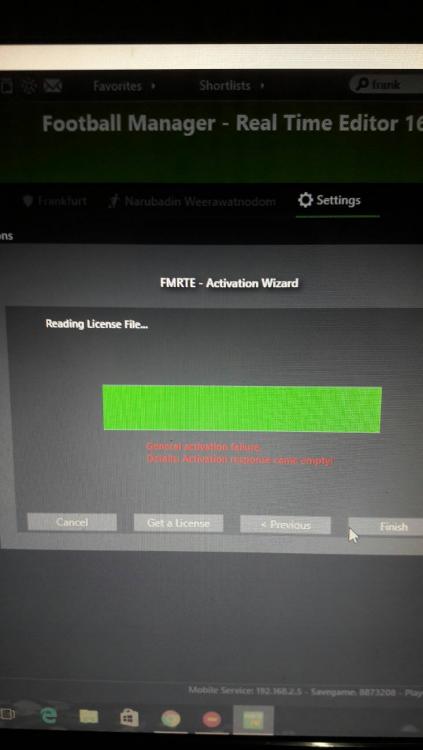
in order to activate your licence please follow these steps

  1. Open FMRTE
  2. Go to "Settings"
  3. Click on "Activate"
  4. Select Online Activation
  5. Copy and Past your licence from your client area in here: http://www.fmrte.com/clientarea
  6. Click Next

If everything goes accordingly you should see a activation success message.

Just now, GoBLiN said:

in order to activate your licence please follow these steps

  1. Open FMRTE
  2. Go to "Settings"
  3. Click on "Activate"
  4. Select Online Activation
  5. Copy and Past your licence from your client area in here: http://www.fmrte.com/clientarea
  6. Click Next

If everything goes accordingly you should see a activation success message.

yea thanks. didn't realise the FMR15 bit was part of the code

1 minute ago, George_Irwin said:

yea thanks. didn't realise the FMR15 bit was part of the code

yeas when I used it thought the same...FMR15 for FMRTE16???


but its right sometimes I get asked to activate after a windows update/FM16 update/Fmrte16 update

it doesn't effect your number of licences and if it does contact support and they will rest your account

42 minutes ago, kingrobbo said:

they have said out soon so be patient:P


and set steam offline in future, no issue then:)

This is only like the third time I've played FM16 since it came out - both FM and FMRTE are usually already updated so I forget to set Steam to offline mode haha... Why do you think I'm eager? The only time I get to play it and I can't use FMRTE to get a reasonable distance into the game :(

5 minutes ago, jakeeypants said:

This is only like the third time I've played FM16 since it came out - both FM and FMRTE are usually already updated so I forget to set Steam to offline mode haha... Why do you think I'm eager? The only time I get to play it and I can't use FMRTE to get a reasonable distance into the game :(

bet you will remember next time:huh:

as soon as fmrte updates get on steam.....offline mode

once again you staff work the ass out of yourself to put in a quick update for all the "fools" that do not put Steam offline, and all the others of us, who now can update the game, and continue to use the best ingame editor available. 

I have a problem with the new update. I upgraded by auto update, and then try to start the program did not get to start, but the screen process see the "FMRTE.exe" process as 3 times and I can not kill him. I uninstalled the FMRTE and download the installer from the website and run and it's the same as before, but this time I have 3 processes called "FMRTE setup bla.exe bla bla". Which may be?

Hello in the fmrate 16.2 is not working match preparation... please fix that . thx

9 hours ago, BraCa said:

FMRTE 16.2.0.17 - Released

Download: FMRTE Autoupdate or http://www.fmrte.com/download/fmrte16

Changelog

Build 17

Added

  • Support for 16.2.0 game version

Fixed

  • Staff international caps/goals

you guys are awesome! keep up the good work and i will buy it next year as well!

I have a big problem. My FMRTE mini is not working at all. When I click on a player from one team, it shows the information from any other player. The only time it shows the correct player is when the a club is interested in this player and you click on "wnt" icon (please check the photos attached). Please help me, I want to play this game so badly but without FRMTE it is not the same.

Thank you in advance.

Fmrte 1.png

Fmrte 3.png

1 hour ago, Gasper007 said:

I have a big problem. My FMRTE mini is not working at all. When I click on a player from one team, it shows the information from any other player. The only time it shows the correct player is when the a club is interested in this player and you click on "wnt" icon (please check the photos attached). Please help me, I want to play this game so badly but without FRMTE it is not the same.

Thank you in advance.

Fmrte 1.png

Fmrte 3.png

Its working fine for me :/

I have just built a Windows 10 Pro 64 bit PC and everything now works fine including Football Manage 2016.  However, whenever I attempt to install FMRTE 2016 I get the error message "This app can't run on your PC.  To find a version for your PC, check with the software publisher".  I looked at you web site for reported problems but found nothing however I did see a notification that Microsoft .NET Framework 4 was required so I downloaded it but it would not install because "Microsoft .NET Framework 4 is already a part of this operating system".  I also ran the "Program Compatibility Troubleshooter" but everything it suggested failed to solve the problem.

Can someone please tell me how to solve this problem?

FMRTE Incompatible with Windows 10.docx

20 hours ago, Chevalier said:

I have just built a Windows 10 Pro 64 bit PC and everything now works fine including Football Manage 2016.  However, whenever I attempt to install FMRTE 2016 I get the error message "This app can't run on your PC.  To find a version for your PC, check with the software publisher".  I looked at you web site for reported problems but found nothing however I did see a notification that Microsoft .NET Framework 4 was required so I downloaded it but it would not install because "Microsoft .NET Framework 4 is already a part of this operating system".  I also ran the "Program Compatibility Troubleshooter" but everything it suggested failed to solve the problem.

Can someone please tell me how to solve this problem?

FMRTE Incompatible with Windows 10.docx

And you say you have tried to right-click on the exe file, and tried to run it as administrator and compatibility with for instance win 8? It should be able to run on win 10, from what I have seen.

On 12/16/2015 at 10:39 PM, kingrobbo said:

yeas when I used it thought the same...FMR15 for FMRTE16???


but its right sometimes I get asked to activate after a windows update/FM16 update/Fmrte16 update

it doesn't effect your number of licences and if it does contact support and they will rest your account

Please make sure that your CPU actually support 64bit OS

More info: Link

Since my PC is running Windows 10 64 bit then I am certain that my CPU supports 64 bit.  As further evidence I attach a screen print showing that I have an Intel i7-4790 CPU and that my system is indeed a 64 bit operating system.

My CPU.png

4 hours ago, beringer said:

And you say you have tried to right-click on the exe file, and tried to run it as administrator and compatibility with for instance win 8? It should be able to run on win 10, from what I have seen.

Yes that is correct and I agree that it should be able to run - but it won't!

I suppose it is possible my downloaded version of FMRTE is corrupted so I will download it once more and try again.

Join the conversation

You can post now and register later. If you have an account, sign in now to post with your account.
Note: Your post will require moderator approval before it will be visible.

Guest
Reply to this topic...

Account

Navigation

Search

Search

Configure browser push notifications

Chrome (Android)
  1. Tap the lock icon next to the address bar.
  2. Tap Permissions → Notifications.
  3. Adjust your preference.
Chrome (Desktop)
  1. Click the padlock icon in the address bar.
  2. Select Site settings.
  3. Find Notifications and adjust your preference.