Leaderboard
-
BraCa
Administrators1Points5079Posts -
Traya
Members1Points2Posts -
L1nL1n1111
Members1Points1Posts



Popular Content
Showing content with the highest reputation on 11/16/25 in all areas
-
1 point
-
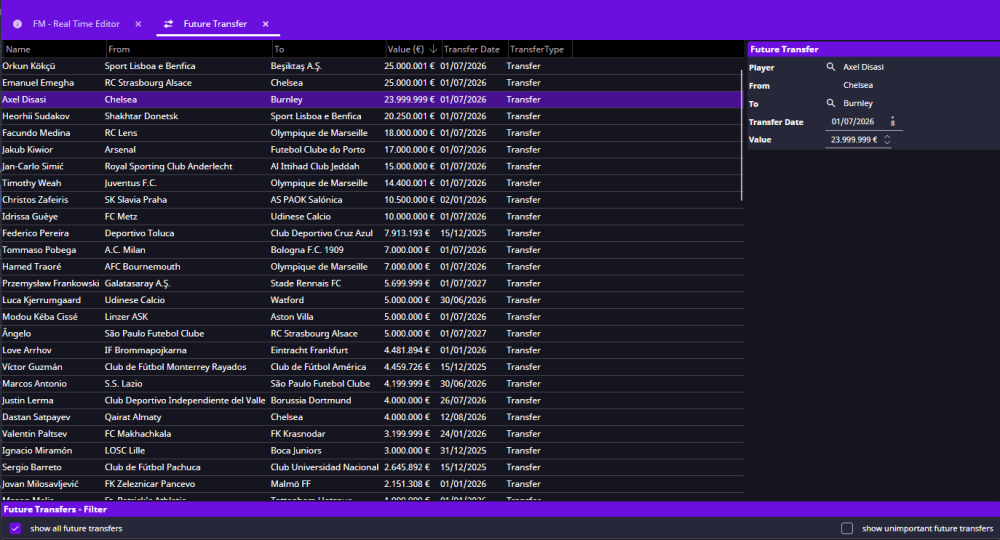
Hello, I´m new to this tool and I'm not sure how to set future tranfers, everytime I change the player to be transfered, FMRTE26 will lose the player contract information and set the player as free agent instead of completing the deal, FMRTE26's screen will show the deal but no player contract, so I'd like to ask you what I'm doing wrong. - Not english native [1]What is your exact FM version: 26.0.4 [2]What is your exact FMRTE version: FMRTE 26.0.4-build15 [3]Are you running FMRTE as administrator- YES [4]Do you have a current license: YES. Picture to show how after changing the player all contract information is lost.
 1 point
 -
1 point
 FMRTE for WindowsThis version of FMRTE was designed to work with FM 26.0.2 ChangelogBuild 8FixedFMRTE crash when clicking on a player inside Club Transfer Center An error loading the game due to lack of Administrator privileges Build 6AddedSupport for FM 26.0.2 BETA Hotfix Build 5AddedHotkey to reload current page (CTRL+R) Added option to filter players by gender on Advanced Search FixedMagnifying glass button not being clickable (edit names, city of birth, etc) Renamed Staff Level of Discipline to Authority Build 2AddedSupport for FM 26.0.1 BETA game version Build 1AddedSupport for FM 26.0.1 BETA game version New setting to control if search results should open in a new tab FixedSome UI issues mini FMRTE not starting Players not being properly loaded How to Enable Experimental featuresGo to FMRTE Settings Check the ‘Enable Experimental Features’ checkbox Press the Save button Known Issues - Features not working yetAdd/remove Nations treated as EU / non foreign Editing Human Teams Advised Staff is disabled in Console Edition Supported BETA VersionsFootball Manager 2026 BETA - 26.0.2 (2228080) Football Manager 2026 BETA - 26.0.1 (2227225) Football Manager 2026 BETA - 26.0.1 (2227758)1 point