Leaderboard
-
BraCa
Administrators5Points5071Posts -
Synthespian
Beta Testers1Points114Posts


Popular Content
Showing content with the highest reputation on 11/30/20 in all areas
-
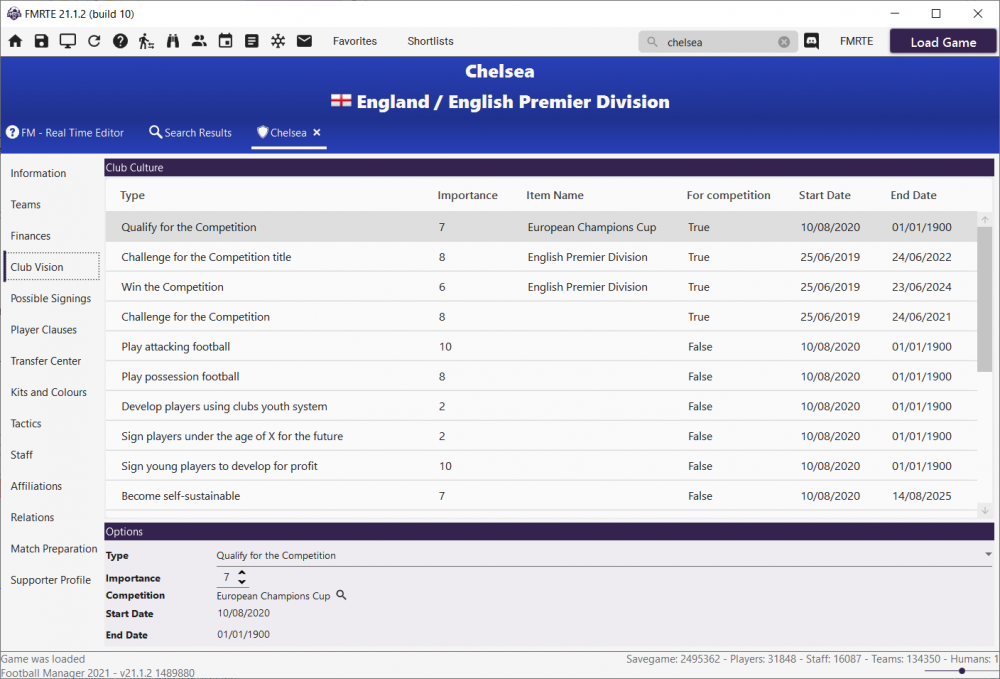
4 pointsFMRTE 21.1.2 (Build 12) - Released Download: FMRTE Auto-update or https://www.fmrte.com/download/fmrte21 Changelog Added Ability to edit Clubs Vision Ability to edit first team number of additional staff More players unhappiness motives Polish translation (not 100% completed yet) Some missing JobTypes (for Staff) Fixed Players unhappiness motives not being displayed Freezer settings not being properly saved Agents relations not being loaded properly An error when saving Agents An issue with human players not being properly loaded Players hair length and color Clubs Allow Licensed kits4 points
-
1 pointOk, so you've asked for it for a few seasons. (Unofficially) Agree. It's a nice thing to have. So ... make a copy of your savegame just after that point so that you can send it to Braca should he want to look into the example. There's also the "move to new stadium" as well. Maybe relabel the thread as "[FEATURE REQUEST] Stadium Expansion Tab" Maybe go and find your old posts. I don't think continually nudging will speed up an answer, and Braca will have priorities to make sure pre-existing functionality is working in v21, and the consider adding stuff. Don't get me wrong, I'm with you, I would like to see more stuff added, but best to be constructive. The caps don't help.1 point
-
1 pointOur next release for FMRTE 21 will have the ability to edit Clubs Vision as an experimental feature Not quite sure, if editing those have any practical effect in game, but at least, changes are visible in game
 1 point