Skip to content

FMRTE 19 for Mac Os

FMRTE 19 for Mac Os


FMRTE for Mac OS

This version of FMRTE was designed to work with FM 19.3.5


Updating notes: Please make sure you remove any previous iFMRTE version


Changelog

Build 50

Added

  • Support for macOS Catalina

Build 49

Added

  • Ability to edit stadiums
  • Ability to search in dropdowns (for ex: when changing a person nationality)

Build 45

Added

  • Filter by current team to advanced search

Fixed

  • Presets not working
  • Filter by contract team

Build 44

Added

  • Support for FM 19.3.5 game version

Build 36

Added

  • Ability to edit competitions (basic information, standings, prize money)
  • Ability to edit clubs/nations kits and colors
  • Shortlists, you can now easily create/load shortlists, and access your ingame shortlists

Fixed

  • Fixed some minor issues

Build 35

Added

  • Support for FM Touch 19.3.4 game version

Build 34

Added

  • Support for 19.3.4 game version

Build 32

Added

  • Support for 19.3.3 game version

Fixed

  • A crash when starting FMRTE, that was affecting some users
  • Future Transfer dates
  • An issue that could cause some Preset Actions to be ignored
  • Duplicated unhappiness motives (when reloading screen)
  • Some other minor issues

Build 31

Added

  • Support for 19.3.2 game version
  • Support for 19.3.1 Touch game version

Fixed

  • An issue when editing players / staff that were frozen

Build 30

Added

  • Support for 19.3.1 game version
  • Missing Club Sponsor types
  • Search for player transfer and team status

Fixed

  • Some errors when opening FMRTE
  • Freeze players or staff members

  • Export players to file

  • An issue preventing Mass Edit from working properly

  • Some other minor issues

Build 29

Added

  • Clubs and Nations Match Preparation
  • Players loans contracts
  • Popup message when a new FMRTE version is available

Fixed

  • An issue when removing a tab
  • Search sometimes not working properly

  • Some other minor issues

Build 28

Added

  • Support for FM 19.3.0 game version
  • Ability to change FMRTE language
    (Some languages are not working yet like for ex, Chinese)
  • Ability to add/edit/remove players languages

  • Ability to add/edit/remove players injuries

  • Ability to add/edit/remove players unavailability

  • Preset manager
    Added ability to create presets to add injuries to players (useful for Destroy team buttons)
    Heal Team, Destroy Team, Inspire Team buttons, can be edited in Preset Manager

Build 26

Added

  • Support for FM 19.2.3 game version

Build 25

Added

  • Support for FM Touch 19.2.2 game version

Build 24

Added

  • Support for FM 19.2.2 game version

Build 21

Added

  • Support for FM Touch 19.2.1 game version

Build 20

Added

  • Support for FM 19.2.1 game version

Build 19

Added

  • Support for FM 19.2.0 game version

Fixed

  • Players int caps/goals

Build 17

Added

  • Support for FM Touch 19.1.5 game version

Build 16

Added

  • Support for FM 19.1.5 game version

Build 14

Added

  • Support for FM Touch 19.1.4 game version

Build 12

Added

  • Support for FM 19.1.4 game version

Build 11

Added

  • Support for FM 19.1.3 game version

Build 10

Added

  • New Formed at Club types
  • New Formed at Country types

Improved

  • Formed at Club button in player page
  • Formed at Country button in player page

Fixed

  • A bug in Mass Edit that would change clubs reputation 
  • Now it's possible to filter Staff by their club name

Build 9

Added

  • Support for FM 19.1.2 game version

Build 8

Fixed

  • iFMRTE closing after granting administrative privileges

Build 7

Fixed

  • Search results being empty

Build 6

Added

  • Support for 19.1.1 game version
 

Supported Versions

  • Football Manager 2019 - 19.3.5 (1225655)
  • Football Manager 2019 - 19.3.4 (1206461)
  • Football Manager 2019 - 19.3.3 (1202861)
  • Football Manager 2019 - 19.3.2 (1201536)
  • Football Manager 2019 - 19.3.1 (1201175)
  • Football Manager 2019 - 19.3.0 (1200130)
  • Football Manager 2019 - 19.2.3 (1187983)
  • Football Manager 2019 - 19.2.2 (1184534)
  • Football Manager 2019 - 19.2.1 (1177438)
  • Football Manager 2019 - 19.2.0 (1173362)
  • Football Manager 2019 - 19.1.5 (1166322)
  • Football Manager 2019 - 19.1.4 (1164389)
  • Football Manager 2019 - 19.1.3 (1163737)
  • Football Manager 2019 - 19.1.2 (1161578)
  • Football Manager 2019 - 19.1.1 (1159619)
  • Football Manager Touch 2019 - 19.3.5 (1225662)
  • Football Manager Touch 2019 - 19.3.4 (1206437)
  • Football Manager Touch 2019 - 19.3.1 (1201208)
  • Football Manager Touch 2019 - 19.2.3 (1188556)
  • Football Manager Touch 2019 - 19.2.2 (1184738)
  • Football Manager Touch 2019 - 19.2.1 (1177421)
  • Football Manager Touch 2019 - 19.2.0 (1173340)
  • Football Manager Touch 2019 - 19.1.5 (1166392)
  • Football Manager Touch 2019 - 19.1.4 (1164394)
  • Football Manager Touch 2019 - 19.1.2 (1161578)
  • Football Manager Touch 2019 - 19.1.1 (1159626)

  • Submitter
  • Submitted
    11/02/2018
  • Category


  • Replies 143
  • Views 63.3k
  • Created
  • Last Reply

Top Posters In This Topic

Most Popular Posts

  • Hi guys,   A quick update regarding iFMRTE.   We are aware that iFMRTE is not at the same level as FMRTE for Windows.   To fill that gap, I'm currently working on a new v

  • Command preset option is not available on the mac version yet.

  • Sérgio Cunha
    Sérgio Cunha

    Hi, thanks for the update   Here are some bugs that I've found: There's still missing the search for players that are listed for transfer and loan. The scroll doesn't work on ev

Posted Images

Featured Replies

On 7/21/2019 at 12:45 AM, culturedleftfoot said:


I can search for the stadium i.e. Anfield.


Click on it but nothing happens.


FM Version 19- 19.3.5

FMRTE 10 - 19.3.5 (build 46)

MAC OS - Mojave 10.14.5

This Message is translated by Google!! I have bad English, sorry.


Hi, I'm Japanese FM & FMRTE User since 2012.


I'm making a Japanese translation in secret...Like a Ninja!! 


But FMRTE For MAC OS version does not support Japanese fonts.


Would you like to be able to specify Japanese fonts?

Edited by timupopo
While Editing

  • 2 weeks later...

FMRTE 19.3.5 (Build 49)

FM 19.3.5 - 1225655 m.e v1931


When I try to save the expiry date of a contract, it doens't save properly. It changes to 01/02/1900. 

  • 1 month later...

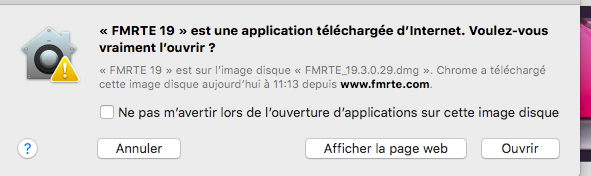
I downloaded the new build 50 update, after having installed it and opened my mac it tells me that it is not possible to start fmrte, as the mac fails to access the presence of malware in the application.
What should I do? Thanks

  • Author
1 hour ago, pavez93 said:

I downloaded the new build 50 update, after having installed it and opened my mac it tells me that it is not possible to start fmrte, as the mac fails to access the presence of malware in the application.
What should I do? Thanks

Can you look at this post 


  • 3 weeks later...

Hi. I got a problem. It says that fmrte supports Fm 2019 touch, but how can I use it on IPad? I downloaded the file (dmg) but can’t do anything more. Please help. Thanks 

  • Author
1 hour ago, Mike Allright said:

Hi. I got a problem. It says that fmrte supports Fm 2019 touch, but how can I use it on IPad? I downloaded the file (dmg) but can’t do anything more. Please help. Thanks 

Hello,


The version of FM Touch we support is for desktop (Windows and macOS) we do not support iPad or any other device

  • 2 weeks later...

Hi I am trying to mass transfer players, however, I can't do it.  Please advise on what to do. thanks!

  • greyfox unfeatured and unpinned this topic
  • 10 months later...
  • 2 months later...

Join the conversation

You can post now and register later. If you have an account, sign in now to post with your account.
Note: Your post will require moderator approval before it will be visible.

Guest
Reply to this topic...

Account

Navigation

Search

Search

Configure browser push notifications

Chrome (Android)
  1. Tap the lock icon next to the address bar.
  2. Tap Permissions → Notifications.
  3. Adjust your preference.
Chrome (Desktop)
  1. Click the padlock icon in the address bar.
  2. Select Site settings.
  3. Find Notifications and adjust your preference.