Skip to content

FMRTE 26 for Windows

FMRTE 26 for Windows

FMRTE for Windows

This version of FMRTE was designed to work with FM 26.3.2


Changelog

Build 42

Added

  • Expanded player competition registration types, including AFC, continental, domestic cup and women’s competition registrations
  • Stadium pitch dimensions, environment, ownership and facility flags
  • Club youth importance, ownership type, chairperson title and transfer embargo age restriction

Fixed

  • Player Information now shows the player’s actual Days in Country value

Build 41

Fixed

  • An error loading the game (“This version of FMRTE is for Football Manager 26 only”) when using mod loaders such as BepInEx

Build 40

Added

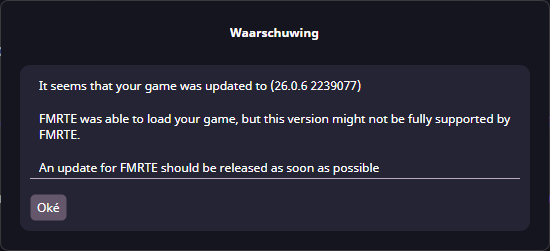
  • Support for FM 26.3.2 game update

Build 39

Added

  • Support for FM 26.3.1 game update

Build 38

Added

  • Support for FM 26.3.0 Console Hotfix game update

Build 37

Added

  • Support for FM 26.3.0 Hotfix game update

Build 36

Added

  • Support for FM 26.3.0 game update

Build 35

Added

  • Support for FM 26.2.0 Hotfix game update

Build 34

Added

  • Support for FM 26.2.0 game update

Build 33

Added

  • Support for FM 26.1.3 Hotfix game update

Build 32

Added

  • Support for FM 26.1.3 game update

Fixed

  • Some minor issues

Build 31

Added

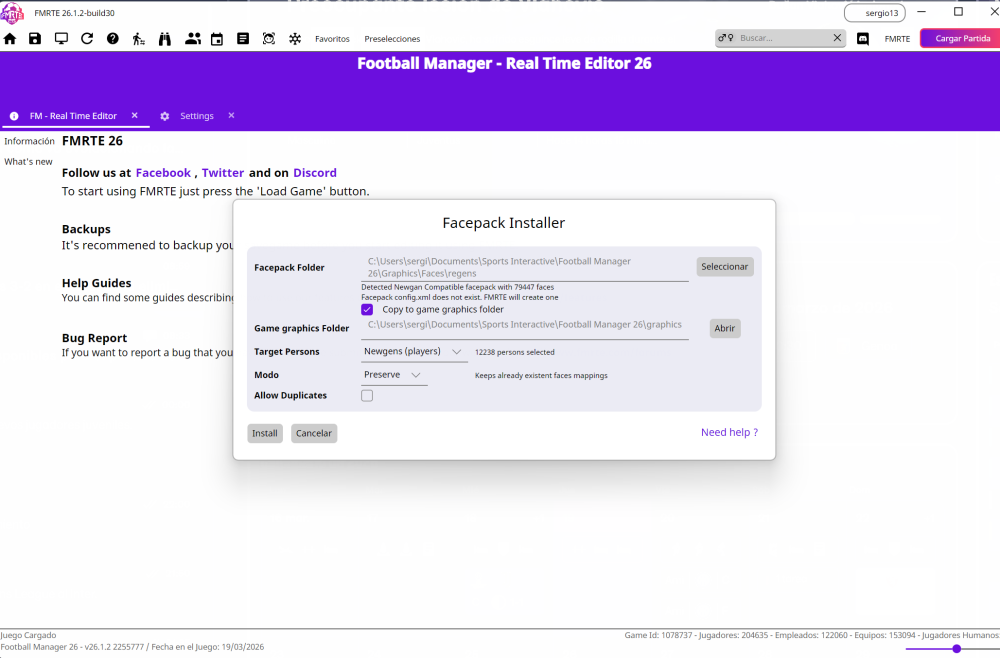
  • Support for NG Regens facepacks

Fixed

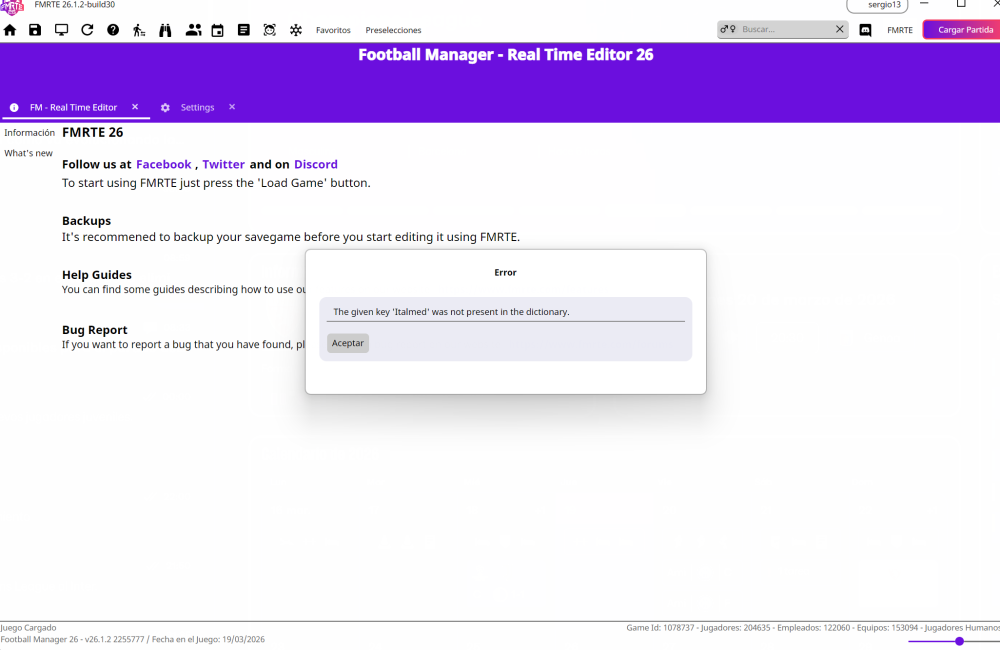
  • An error when installing facepacks (e.g., “The given key ‘SAMed’ was not present in the dictionary”).

Build 30

Added

  • Support for FM Console 26.1.2 2255450

Build 29

Added

  • Support for FM 26.1.2 game update

Build 28

Added

  • In Possession / out of Possession roles

Fixed

  • Some UI issues
  • Persons Languages tab - Languages are now sorted alphabetically

Changed

  • Double-clicking a search result no longer automatically switches to the new tab (configurable in FMRTE Settings)

Updated

  • French translation

Build 27

Added

  • Support for FM 26.1.1 game update

Build 26

Added

  • Support for FM 26.1.1 2248127 game update (Public Beta)

Build 25

Added

  • Support for FM 26.1.0 game update

Build 24

Added

  • Support for FM 26.1.0 2245537 (Public Beta)

Build 23

Added

  • Support for FM Console 26.0.6 2239134

Build 22

Added

  • Support for FM 26.0.6 2239191

Build 21

Added

  • Support for FM Console 26.0.5 2234654

Fixed

  • Sorting not working for some columns

Build 20

Added

  • Support for FM 26.0.5 2234684

Updated

  • Korean translation

Build 19

Added

  • Support for FM 26.0.5 2234684 (BETA)
  • Support for FM Console 26.0.4 2232247

Fixed

  • Sorting not working for some custom columns
  • Hotkeys to close tabs not working

Build 17

Added

  • New affiliation types
  • Clubs Players gender to some views
  • Gender filter to search bar
  • Staff out of possession prefered formations
  • Players body type
  • Hotkey to open advanced filter (CTRL+F)
  • Hotkey to open mass edit (CTRL+M)
  • Swap staff

Fixed

  • Prefered formations
  • Staff coaching attributes (goalkeeping, possession)
  • An error when editing a future transfer
  • Missing contract for some staff members

Build 15

Added

  • Support for 26.0.4 2231458

Build 14

Added

  • Clubs Match Preparation (tactics familiarity)
  • Support for Console Edition
  • Support for 26.0.4.2231458 Public Beta

Fixed

  • Advanced Search - Filter by asking price not working

Build 12

Added

  • Support for FM 26.0.3

Fixed

  • Data grids columns spacing
  • Players Asking price

Build 11

Fixed

  • A bug that caused the app to won’t start
  • Light theme colors
  • miniFMRTE not saving changes

Build 10

Added

  • Happiness and Playing Happiness to Inspire / Destroy team presets
  • Hotkey to save current tab (CTRL+S)

Fixed

  • Create new and/or Loading shortlist files

Build 9

Added

  • Support for FM 26.0.3 BETA Hotfix

Build 8

Fixed

  • An error loading the game due to lack of Administrator privileges
  • FMRTE crash when clicking on a player inside Club Transfer Center

Build 7

Fixed

  • An error loading the game due to lack of Administrator privileges

Build 6

Added

  • Support for FM 26.0.2 BETA Hotfix

Build 5

Added

  • Hotkey to reload current page (CTRL+R)
  • Added option to filter players by gender on Advanced Search

Fixed

  • Magnifying glass button not being clickable (edit names, city of birth, etc)
  • Renamed Staff Level of Discipline to Authority

Build 2

Added

  • Support for FM 26.0.1 BETA game version

Build 1

Added

  • Support for FM 26.0.1 BETA game version
  • New setting to control if search results should open in a new tab

Fixed

  • Some UI issues
  • mini FMRTE not starting
  • Players not being properly loaded

How to Enable Experimental features

  • Go to FMRTE Settings
  • Check the ‘Enable Experimental Features’ checkbox
  • Press the Save button

Supported Versions Steam/Epic Store

  • Football Manager 2026 - 26.3.2 (2329565)
  • Football Manager 2026 - 26.3.1 (2314564)
  • Football Manager 2026 - 26.3.0 (2283239, 2286575)
  • Football Manager 2026 - 26.2.0 (2275071, 2276383)
  • Football Manager 2026 - 26.1.3 (2265543, 2266940)
  • Football Manager 2026 - 26.1.2 (2255777)
  • Football Manager 2026 - 26.1.1 (2248127, 2248379)
  • Football Manager 2026 - 26.1.0 (2245540)
  • Football Manager 2026 - 26.0.6 (2239191)
  • Football Manager 2026 - 26.0.5 (2234962, 2234654)
  • Football Manager 2026 - 26.0.4 (2231458)
  • Football Manager 2026 - 26.0.3 (2228954)

Supported Versions Microsoft Store

  • Football Manager 2026 - 26.3.2 (2329565)
  • Football Manager 2026 - 26.3.1 (2314564)
  • Football Manager 2026 - 26.3.0 (2283239, 2286136)
  • Football Manager 2026 - 26.2.0 (2275071, 2276383)
  • Football Manager 2026 - 26.1.3 (2265543, 2266940)
  • Football Manager 2026 - 26.1.2 (2255777)
  • Football Manager 2026 - 26.1.1 (2248127, 2248379)
  • Football Manager 2026 - 26.1.0 (2245540)
  • Football Manager 2026 - 26.0.6 (2239191)
  • Football Manager 2026 - 26.0.5 (2234962, 2234654)
  • Football Manager 2026 - 26.0.4 (2231458)
  • Football Manager 2026 - 26.0.3 (2228954)

Supported Versions Console Edition

  • Football Manager 2026 - 26.3.2 (2329845)
  • Football Manager 2026 - 26.3.1 (2317597)
  • Football Manager 2026 - 26.3.0 (2283924, 2283239, 2287101)
  • Football Manager 2026 - 26.2.0 (2275071)
  • Football Manager 2026 - 26.1.3 (2264027)
  • Football Manager 2026 - 26.1.2 (2255450)
  • Football Manager 2026 - 26.1.0 (2245075)
  • Football Manager 2026 - 26.0.6 (2239134)
  • Football Manager 2026 - 26.0.5 (2234654)
  • Football Manager 2026 - 26.0.4 (2232247)
  • Football Manager 2026 - 26.0.0 (2224990)

Supported BETA Versions

  • Football Manager 2026 BETA - 26.1.1 (2248127)
  • Football Manager 2026 BETA - 26.1.0 (2245537)
  • Football Manager 2026 BETA - 26.0.5 (2234654)
  • Football Manager 2026 BETA - 26.0.4 (2231458)
  • Football Manager 2026 BETA - 26.0.3 (2228945)

File Information

Submitter BraCa

Submitted 10/30/25

Category Football Manager 26

View File

FMRTE 26 for Windows

  • Replies 269
  • Views 46.2k
  • Created
  • Last Reply

Top Posters In This Topic

Most Popular Posts

  • It looks like there has been yet another update to the game it is now 26.1.2 there is no need for any further posts concerning this including starting new threads or PM staff. Please also do not as

  • FMRTE 26.0.6 (build 22) - Released Download: FMRTE Auto-update or https://www.fmrte.com/download/fmrte26 Added Support for 26.0.6 update

  • culturedleftfoot
    culturedleftfoot

    The Dev will release a new Build when he can to whatever platforms need an update. This is going to happen a lot as FM26 will need countless fixes by the look of it, so when it happens again state wh

Posted Images
Featured Replies

Great work as always.

Is the Stadium Editor in this version or has it not been developed yet?

Thanks all

Is there a way to forcibly remove a retirement that hasn't been announced yet? I'm looking at a few players like Messi, Ronaldo, Neymar and they all have the "Ret" icon on their names in FMRTE but only Ronaldo has a date set. I just checked Neymar and he doesn't have a date set, plus it also doesn't list him as retiring after current spell at club so I'm not sure why the "Ret" shows. What's going on in the background of the game that it shows in FMRTE but not in the game?

5 hours ago, issoho said:

Windows 10 operating system, unable to run the FMRTE26 software. I have attached the log file. Please help me check it. Thank you.

velopack.log

Having exact same issue - worked fine last night but this morning FMRTE26 doesn't open.

***Update - I just uninstalled and re-installed FMRTE26 and it now works without issues.

Afternoon all - I love FMRTE but I've always only used it as a scouting tool and never to make changes/save changes anywhere - however, for some reason miniFMRTE although it opens and we can change the settings etc, whenever we leave and restart the app, it loses it's settings - even if I backup the correct Players.json file, it simply doesn't load it on application loading for some reason. I appreciate if this can be checked.

Thanks for the awesome work, as always!

Hi All,

Im sure you are aware, but there has been an update to FM Beta that will require supporting,

Cheers

It's crazy how SI is updating this game. Sadly build 8 is not working with latest patch (26.0.3.2228945)

I know barca will update the game, just a heads up ;)

19 hours ago, BossPenguin said:

Brilliant speedy work, appreciate everyone involved efforts.

With the Facepack installer previously we had to clear the cache and reload the skin, an option which is no longer available, is there anything we should do instead?

As with other graphic mods, I guess restarting the game should suffice.

Hello.
Thanks for the great work! Congrats.
One remark: The tactic knowledge screen disappeared on the new version.
Is it because you couldn't make it work with the new tactics system?

(I don't post it in the bug reports as I don't think it's a bug. Apologies if I should put it there.)

My file says it is up to date, but it also says it is Build6, not Build9, and it isn't working with the 26.03 update. I uninstalled and reinstalled and rebooted, still no luck. Any suggestions?

23 hours ago, culturedleftfoot said:

If anyone finds a bug please report it in the bugs forum not in this thread

you can post it here but you need to submit a bug report too.

Anyone with the exact same issue can add to a bug report-if your issue is not exactly the same submit your own report

Tips

NB-Are you running FMRTE as administrator-  [This is suggested/ important as most issues are caused by not running the App correctly-RIGHT CLICK on App Run as administrator]

If getting issues make sure this box is ticked in settings -Debug Mode then save the change. Exit FMRTE and launch again.

make sure release channel is set to-stable and not Beta

 eed1ba45a3419ad2df96209f3572cf60.png

any error log generated submit with your bug report

NB Mac and other platforms are being worked on and will be released in due course please stop asking when this will be

cheers

Any license/installation/purchasing/download issues read this

New members read this thread before posting-look at the Tips to fix some issues.

10 hours ago, issoho said:

Windows 10 operating system, unable to run the FMRTE26 software. I have attached the log file. Please help me check it. Thank you.

velopack.log

4 hours ago, lghost23 said:

Afternoon all - I love FMRTE but I've always only used it as a scouting tool and never to make changes/save changes anywhere - however, for some reason miniFMRTE although it opens and we can change the settings etc, whenever we leave and restart the app, it loses it's settings - even if I backup the correct Players.json file, it simply doesn't load it on application loading for some reason. I appreciate if this can be checked.

Thanks for the awesome work, as always!

2 minutes ago, mbrown4464 said:

My file says it is up to date, but it also says it is Build6, not Build9, and it isn't working with the 26.03 update. I uninstalled and reinstalled and rebooted, still no luck. Any suggestions?

Same here

12 minutes ago, mbrown4464 said:

My file says it is up to date, but it also says it is Build6, not Build9, and it isn't working with the 26.03 update. I uninstalled and reinstalled and rebooted, still no luck. Any suggestions?

10 minutes ago, AVFC1990 said:

Same here

5 minutes ago, culturedleftfoot said:

there seems to be an issue with the App updating

@BraCa

press check for updates it stated I am on current build

cheers

d50e635c61e4091a95064fde84516575.png

Can anyone teach me how to change Managers using Fmrte? Tried swapping them around but doesn`t do the trick

49 minutes ago, culturedleftfoot said:
  1 hour ago, mbrown4464 said:

My file says it is up to date, but it also says it is Build6, not Build9, and it isn't working with the 26.03 update. I uninstalled and reinstalled and rebooted, still no luck. Any suggestions?

  1 hour ago, AVFC1990 said:

Same here

  54 minutes ago, culturedleftfoot said:

there seems to be an issue with the App updating

I did a fresh install-https://www.fmrte.com/files/file/163-fmrte-26-for-windows/

now I am on Build 9

seems to be an issue with the updater, Braca will fix that😉

Can I change the work permit for a player in England with FMRTE?

37 minutes ago, DanS said:

Can I change the work permit for a player in England with FMRTE?

You can give a player a UK or Irish second nationality and that will then mean the player won't need a work permit.

hey guys quick questions, i tried swapping staff and there is a pop up that states "in fm26, changes are only reflected after a few days". that's fine, but I've simmed 2 weeks and the changes are still not reflected. do you know how long it takes for staff swaps to happen in fm26?

Join the conversation

You can post now and register later. If you have an account, sign in now to post with your account.
Note: Your post will require moderator approval before it will be visible.

Guest
Reply to this topic...

Account

Navigation

Search

Search

Configure browser push notifications

Chrome (Android)
  1. Tap the lock icon next to the address bar.
  2. Tap Permissions → Notifications.
  3. Adjust your preference.
Chrome (Desktop)
  1. Click the padlock icon in the address bar.
  2. Select Site settings.
  3. Find Notifications and adjust your preference.