Leaderboard
-
BraCa
Administrators72Points5029Posts -

culturedleftfoot
Senior Moderators11Points10265Posts -
crotius
Members3Points5Posts -
juaqin1989
Members3Points20Posts



Popular Content
Showing content with the highest reputation since 06/18/12 in Bug Report Comments
-
3 points
-
Mine was a different folder, but when I created that folder in the BraCa Soft directory, the error goes away. Easy fix, but hopefully its a bug that can be fixed in the next update.3 points
-
I am not the Dev he will fix it when he can thanks for your patience2 points
-
Same issue here. Mac user also. FMRTE24.mov.zip2 points
-
I'm closing, since this will be fixed in build 52 points
-
Just to be clear, this won't be fixed today for sure. I will see if I can bring back the ability to edit future contracts for transfers that are not confirmed yet. Anyway, this should not be a big issue since you can edit the Future Contract as soon as the transfer gets confirmed, or when the player arrives to the new club2 points
-
2 pointsHi, Please try this new version FMRTE.20.4.4.49.dmg Let me know if it worked. Thanks2 points
-
2 pointsI am having the same issue. I am on macOS Mojave 10.14.6 I don't want to be forced to update to Catalina, heard nothing but bad things about it. Is there a fix coming?2 points
-
yes pls tell him, cuz I dont wanna pay for this mess, FM 26 is more than enough for me1 point
-
Hi guys, Can you check with build 17? Thanks1 point
-
1 point
-
1 point
-
1 point
-
1 pointIt's indeed the save type, i think there's an issue with the new "real life" save mode. I picked the same team and now i have access to the transfert center part of the app without getting errors. It was my first time doing this kind of save so i'm not sure it is a new bug.1 point
-
Hi @Mehdi Sadqi That's a known issue that we it's visible in the Known issues section of the download page. Currently, there is nothing we can do to make that feature work without causing the game to crash Cheers1 point
-
Hi @Yee I've tried to fix it, but I don't think I can 😕1 point
-
@VidiPT89 can you upload the error.log file? @khokhlov you have a different issue (that will be fixed in our next release)1 point
-
1 pointThanks I've fixed this in the latest release (build 3) This won't fix any staff member that was swapped before this release1 point
-
1 point
-
1 pointHi @culturedleftfoot This will be fixed in our next release build 24 Thanks1 point
-
Hi @vlada Can you please update to the latest version (build 22) and see if it works? Thanks1 point
-
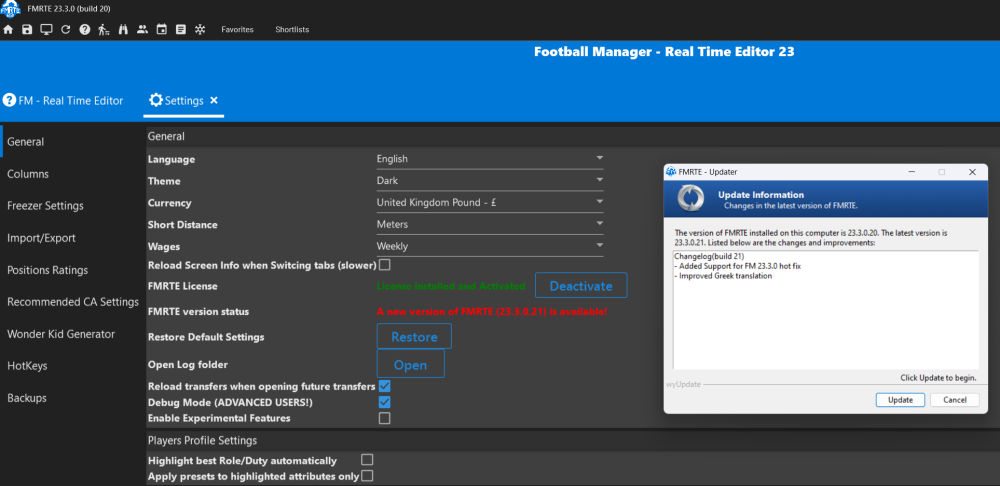
Today I was advised "A new version of FMRTE (23.3.0.21) is available". I clicked the update button and it installed. However, when I attempted to load a game nothing happened and no error messages were generated. In the light of your feedback that this is not a bug, then I am afraid that I do not know how this should be classified.
 1 point
 -
Hi, This is not a bug, when the game is updated, you need to wait until we release an update for FMRTE1 point
-
1 point
-
It is not a bug/problem. The message is self-explanatory. "an update should be release as soon as possible". FM launched a new major update (22.2), TODAY (a few hours ago). So we have to wait until the FMRTE team make the changes to the program be compatible again. You can disable FM auto updates, so that won't happen.1 point
-
Hi, Thanks for reporting this issue, it will be fixed in our next release (build 14)1 point
-
Hi, Thank you for reporting this, it will be fixed in our next release (build 12) Cheers1 point
-
1 point
-
1 pointHi, Thank you for reporting this issue, it will be fixed in our next release (build 3). I suggest you to restore a backup of your savegame to ensure that there is no data corruption caused by this bug. Cheers1 point
-
Hi, We have released a new version (build 23) to fix this issue. Please update to the latest version. Download: FMRTE Auto-update or https://www.fmrte.com/download/fmrte21 Thanks1 point
-
I can confirm this works! Make a folder with the name: Frozen Players in that folder make a folder with number you get1 point
-
1 point
-
1 pointHi, Thank you, this issue will be fixed later tonight in our next release (build 14)1 point
-
1 pointHi, Thank you for your report, this will be fixed in our next release (build 11)1 point
-
1 pointNo problem1 point
-
1 point
-
1 pointHi, Can you please attach here the error.log file that should be in FMRTE 21 folder? Thanks1 point
-
1 pointCool, I'll let you know if I have any problems with future builds, but hopefully that sorts it.1 point
-
Hi, Thank you for your report, this feature will be fixed in our next release (build 3) Thanks1 point
-
Hi @demo1987 Thanks for reporting this, it will be fixed in our next release (build 42) Thanks1 point
-
1 point
-
Step 7. Retry 1 to 6, but without step 3, loading FMRTE, and you will notice the tactic is fine, doesn't change.1 point
-
1 point
-
1 pointHi, It's not a bug, when the game is updated, a new version of FMRTE is also required. We have just updated FMRTE to support the latest FM Touch update, download it Cheers1 point
-
1 pointWe've found the problem, it will be fixed in our next release (build 26) Cheers1 point
-
When you have players/staff frezed, FMRTE is always restoring those players attributes. If you reload your game without closing FMRTE, then FMRTE might try to players attributes, but as the game changed and FMRTE isn't aware, it might corrupt the game, that's why you get some crashes. I'll see if there is anyway to improve this, but to be safe, it's better to close it while the game is reloading1 point
-
1 point
-
1 point
-
1 pointSorry about the delay i was abroad and could not check. Seems to be working fine now1 point