Skip to content

FMRTE 27 for Windows

FMRTE 27 for Windows

FMRTE for Windows

This version of FMRTE was designed to work with FM 27.1.0


Changelog

Build 14

Added

  • Support for Console Edition (27.1.0 2506668)
  • Grids - CA / PA Difference column
  • Move to Club - move staff now or with an arranged transfer (experimental feature)

Changed

  • Main tabs - faster scrolling with the arrows and mouse wheel

Fixed

  • Grids - Balance attribute column showing as money

Build 13

Added

  • Support for Game update (27.1.0 2505117)
  • Board Requests - accept a rejected request, bring the answer forward or remove it

Build 12

Added

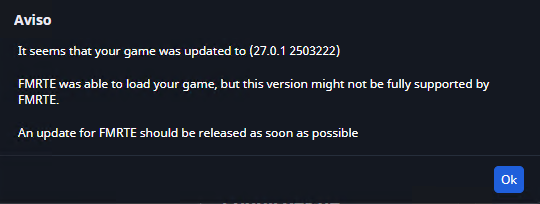
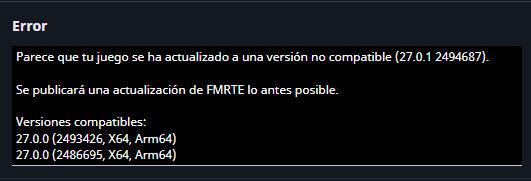
  • Support for Game update (27.0.1 2503222)
  • Loan Contract - loan-to-buy fee: optional, mandatory or after a number of matches
  • Loan Contract - future fees and clauses for a loan-to-buy
  • Loan Contract - unused wage
  • Future Transfers - edit the fees and clauses set in Move to Club

Changed

  • Loan Contract - laid out like Move to Club, cards fold and show a * for unsaved edits
  • Loan Contract - buy back fee is now set in Future Additional Clauses
  • Future Transfers - details under the list, filters on the right

Fixed

  • Future Transfers - contract start date going back after changing the transfer date

Build 11

Fixed

  • Grids - FMRTE closing when sorting by some columns, such as Loaned To Team

Build 10

Added

  • Support for Console Edition (27.0.1 2494983)

Build 9

Added

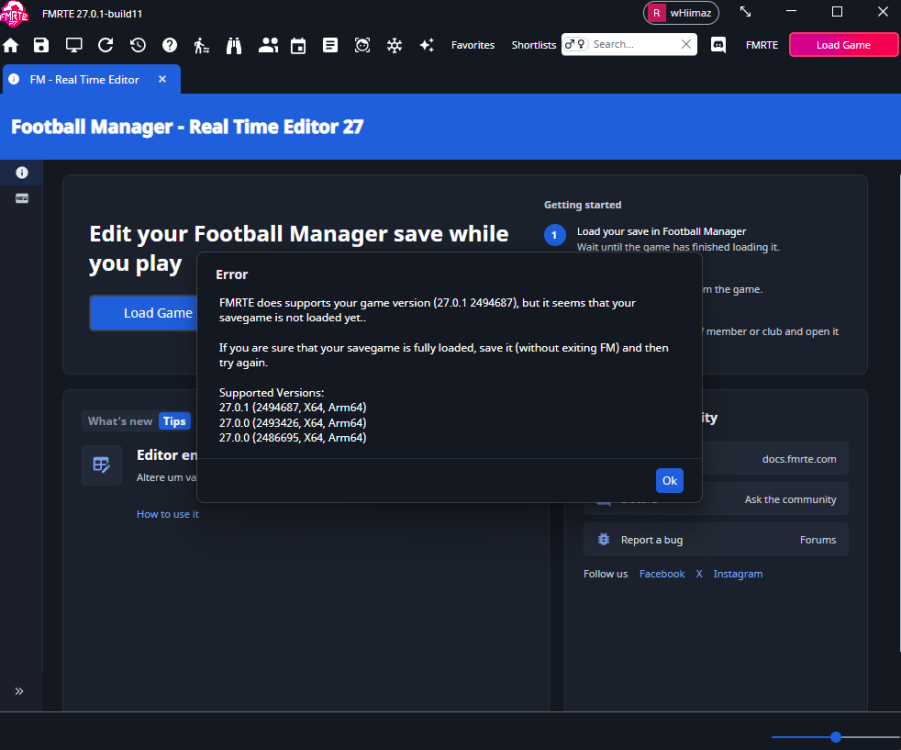
  • Support for Game update (27.0.1 2494687)
  • Move to Club - loan unused wage percentage and unused monthly fee
  • Move to Club - mandatory loan-to-buy fee
  • Move to Club - future fees and clauses for a loan-to-buy
  • Club squad list - Filter not at club hides players who are out on loan
  • Club squad list - names of loaned-in players in blue, loaned-out players in red

Fixed

  • Grids - contract Started column showing the time as well as the date
  • Move to Club - fee transfers not changing either club’s transfer budget
  • Move to Club - loan buy back fee lost when the loan club bought the player
  • Move to Club - values typed for the last move left in the form

Build 8

Added

  • Header pills - hide or show each one in Settings or by right-clicking the header
  • Loan Rules - edit a nation’s loan limits on its Transfer Rules tab
  • Staff - show and edit the Joined Club and Signed dates on staff contracts

Changed

  • Settings - header image options moved to Appearance > Header
  • Transfer Rules - cards fold, showing a summary and a * for unsaved edits
  • Transfer Rules - rules not kept in the save show an “Until reload” tag
  • Human Manager - Move to Club now sends a job offer instead of moving the manager directly

Fixed

  • Tactical Understanding - Match Exposure not staying at 100 after Max when the tactic was changed
  • Human Manager - freeze button not working

Build 7

Added

  • Tactical Understanding for national teams
  • Added toggle to show players potential attributes
  • Added training contribution to tactical understanding page
  • Move to Club - Tomorrow button for the transfer date
  • Youth intake - shows when the candidates appear and when they join your club

Changed

  • Arranging a transfer now opens the player’s Future Transfers tab
  • Move to with fee now pre-fills the amount with the current asking price

Fixed

  • Match ticket price - edits now apply to cup and European games and last into the next season

Build 6

Added

  • Settings - changes now apply right away
  • Save button - shows how many changes are not saved yet
  • Team Cohesion on the Tactical Understanding page, with its own Max button
  • Tactical Understanding - new page layout, showing your tactics
  • Human Manager - move to another club or national team (experimental feature)
  • Rename players and staff to any name
  • Ability to view and edit your club’s upcoming youth intake

Fixed

  • Maximize Tactical Understanding
  • Renaming a person - game crashing later, or the name changing after a reload
  • Edited players positions reverting after some time
  • Move to club (including loan) - “Unable to create a new contract” error
  • Fixed dates not saving on some regional settings

Build 5

Added

  • Support for Game update (27.0.0 2493426)

Build 4

Added

  • Ability to view and edit club wage contributions
  • Nation data grid columns: men’s and women’s (Importance, FIFA Position, Youth Rating…)
  • Ability to import players from legacy .pxml files
  • Competition rules: edit outfield, non-EU and squad salary limits (where the competition has them)
  • Competition rules: edit max squad size in some more competitions (Ligue 1, European League…)
  • Competition rules: edit MLS reserve players limit
  • Club finances: edit maximum squad salary (Spanish clubs only)
  • Transfer players like the game: arrange a move with a fee, a date and terms
  • Player loan contract buy back fee, purchase after matches and the parent club cup clause

Fixed

  • Club finances - income statements not showing any values
  • Nation transfer preferences - changes only saved on the first row
  • Manager profile - columns pushed off the screen at some display scales
  • Recommended CA - now much closer to the player’s actual current ability
  • AI Assistant: chats locking up on local models after the tool limit
  • AI Assistant: local server errors now show the server’s own message
  • AI Assistant: Claude follow-up messages failing with HTTP 400
  • AI Assistant: Claude chats now use prompt caching to lower costs

Build 3

Added

  • Ability to edit cities
  • Role Weights settings (Settings > Ratings)
  • Advanced Search: ethnicity filter
  • Tactics: role ratings on the cards, selection score on hover
  • Tactics: choose the selection criteria
  • Ability to edit awards
  • AI Assistant: response timeout per provider (Settings > AI Assistant > Advanced)

Fixed

  • Copying grid rows (CTRL+C)
  • Attribute colours not matching the game
  • Ability Weights columns cut off in small windows
  • AI Assistant: Gemini 3 models failing with HTTP 400
  • AI Assistant: provider errors now show the provider’s own message

Build 2

Fixed

  • Saves with more than 1 million persons failing to load
  • Empty contract columns (expiry date, signed date, transfer status…) in squad, staff and search lists

Build 1

Added

  • Support for FM 27.0.0 preview game version
  • Quick search overlay (CTRL+F) with history, previews and natural-language queries
  • Reworked Advanced Search, Mass Edit, Preset Manager and Freezer dialogs
  • Compact entity header with faces and logos
  • Edit history with undo, edited/saved field marks and unsaved-changes prompts
  • Player role ratings using the game’s formula, with best role
  • Actual and Potential ratings combine the best role rating with CA/PA
  • Read-only player statistics with league comparisons
  • Player promises (list, add, edit and remove)
  • Player work permits (add, edit and remove)
  • Player long-term future job
  • Players ethnicity (edit and mass edit)
  • Player-coach staff details on the player page
  • Clone Center
  • Clubs Tactics tab from the team’s own tactic
  • Edit formation positions on Team Selection
  • Nations Tactics tab using Team Selection
  • Nation Transfer Rules and Competition Rules tabs (experimental)
  • Edit competitions squad registration limits
  • Presets: Match preparation and All-in-one squad screen
  • Presets: set or remove a spoken language
  • Presets: set or remove release clauses
  • Save a Mass Edit tab as a preset
  • Advanced Search filters by continent, region and city of birth
  • Advanced Search filters clubs by total debt and monthly debt repayments
  • Data grid columns: Body Type, Nationality Info, Joined Club, Gender and non-EU in Italy
  • Data grid column picker, with column order, width and sort kept across restarts
  • Shift+click on a column header adds a secondary sort
  • Improved current screen
  • Person full name and shirt name
  • Settings page with search
  • AI Assistant (experimental)

Fixed

  • Some UI issues
  • Lost data grid selection and scroll position when changing tabs
  • Lost club edits when moving between team and finances
  • Swapping staff not moving scouting assignments
  • Main window not fitting the screen
  • Import players not updating the view
  • Game rating colors

How to Enable Experimental features

  • Go to FMRTE Settings
  • Check the ‘Enable Experimental Features’ checkbox
  • Press the Save button

Supported Versions Steam/Epic Store

  • Football Manager 2026 - 27.1.0 (2505117)
  • Football Manager 2026 - 27.0.1 (2494687, 2503222)
  • Football Manager 2026 - 27.0.0 (2486695, 2493426)

Supported Versions Microsoft Store

  • Football Manager 2026 - 27.1.0 (2505117)
  • Football Manager 2026 - 27.0.1 (2494687)
  • Football Manager 2026 - 27.0.0 (2486695, 2493426)

Supported Versions Console Edition

  • Football Manager 2026 - 27.1.0 (2506668)
  • Football Manager 2026 - 27.0.1 (2494983)

File Information

Submitter BraCa

Submitted 10/30/26

Category Football Manager 27

View File

FMRTE 27 for Windows

  • Replies 90
  • Views 5k
  • Created
  • Last Reply

Top Posters In This Topic

Most Popular Posts

  • FMRTE 27.0.0 (build 3) - Released Download: FMRTE Auto-update or https://www.fmrte.com/download/fmrte27 Added Ability to edit cities Role Weights settings (Settings > Ratings) Advanced Search: et

  • Hi, will there be an update today, given that a game update has already been released?

  • Not being rude but as stated in the post above yours...

Posted Images

Featured Replies

11 minutes ago, BYFFF said:

Is it known whether it will be available today? Thanks.

As stated, an update will be released when the dev is ready. On discord he stated that it will be today.

image.png

  • Author

FMRTE 27.0.0 - Build 5 - Released

Download: FMRTE Auto-update or https://www.fmrte.com/download/fmrte27

Added

  • Support for Game update (27.0.0 2493426)

  • Ability to view and edit club wage contributions

  • Nation data grid columns: men’s and women’s (Importance, FIFA Position, Youth Rating…)

  • Ability to import players from legacy .pxml files

  • Competition rules: edit outfield, non-EU and squad salary limits (where the competition has them)

  • Competition rules: edit max squad size in some more competitions (Ligue 1, European League…)

  • Competition rules: edit MLS reserve players limit

  • Club finances: edit maximum squad salary (Spanish clubs only)

  • Transfer players like the game: arrange a move with a fee, a date and terms

  • Player loan contract buy back fee, purchase after matches and the parent club cup clause

Fixed

  • Club finances - income statements not showing any values

  • Nation transfer preferences - changes only saved on the first row

  • Manager profile - columns pushed off the screen at some display scales

  • Recommended CA - now much closer to the player’s actual current ability

  • AI Assistant: chats locking up on local models after the tool limit

  • AI Assistant: local server errors now show the server’s own message

  • AI Assistant: Claude follow-up messages failing with HTTP 400

  • AI Assistant: Claude chats now use prompt caching to lower costs

Hello, I've added a Gemini API key instead of a GPT key for the AI assistant, but Gemini does not show up as a selectable model in the chat interface. How can I fix this @BraCa

image.png

42 minutes ago, lordcellad said:

Hello, I've added a Gemini API key instead of a GPT key for the AI assistant, but Gemini does not show up as a selectable model in the chat interface. How can I fix this

image.png

Hi

Perhaps it isnt compatible or there is a random bug, only the Dev can confirm this

thanks for reporting

cheers

  • Author

FMRTE 27.0.0 - Build 6 - Released

Download: FMRTE Auto-update or https://www.fmrte.com/download/fmrte27

Added

  • Settings - changes now apply right away

  • Save button - shows how many changes are not saved yet

  • Team Cohesion on the Tactical Understanding page, with its own Max button

  • Tactical Understanding - new page layout, showing your tactics

  • Human Manager - move to another club or national team (experimental feature)

  • Rename players and staff to any name

  • Ability to view and edit your club’s upcoming youth intake

Fixed

  • Maximize Tactical Understanding

  • Renaming a person - game crashing later, or the name changing after a reload

  • Edited players positions reverting after some time

  • Move to club (including loan) - “Unable to create a new contract” error

  • Fixed dates not saving on some regional settings

Latest update bug - new tactical understanding - you cannot select your 2nd tactic, button doesnt work. you are stuck on tactic 1

Just stuff I've noticed from testing as I loved having fun with it:

Editing a city to make it very attractive and increasing the population used to mean the club had great merchandise sales. The feature is back now but doesn't have any effect on club finances through merch sales.

Also, increasing the match ticket prices has no effect on finances through gate receipts.

Just thought I'd bring that to your attention.

Hey BraCa and team/staff.
I apologize in advance if this question has come up. I did read through, but did not find anyone else asking about it.
But the freezer function, to freeze CA/PA and attributes does not seem to work as intended.
I've gone into settings and selected that CA and all attributes on my frozen players are to be frozen without being able to increase.
But players still increase in training and CA points?

Thanks for all your hard work.
//Martin

7 hours ago, Chikere Asogwa said:

Just stuff I've noticed from testing as I loved having fun with it:

Editing a city to make it very attractive and increasing the population used to mean the club had great merchandise sales. The feature is back now but doesn't have any effect on club finances through merch sales.

Also, increasing the match ticket prices has no effect on finances through gate receipts.

Just thought I'd bring that to your attention.

33 minutes ago, Martin_Bahn said:

Hey BraCa and team/staff.
I apologize in advance if this question has come up. I did read through, but did not find anyone else asking about it.
But the freezer function, to freeze CA/PA and attributes does not seem to work as intended.
I've gone into settings and selected that CA and all attributes on my frozen players are to be frozen without being able to increase.
But players still increase in training and CA points?

Thanks for all your hard work.
//Martin

Hi both

Thanks for the reports

can you state -

build of FMRTE you are on

are you Running App as suggested-Right click on App select Run as administrator

cheers

@Chikere Asogwa the merchandise sale may take time to kick in? I am unsure the Dev may have to clarify that

  • Author
15 hours ago, Chikere Asogwa said:

Just stuff I've noticed from testing as I loved having fun with it:

Editing a city to make it very attractive and increasing the population used to mean the club had great merchandise sales. The feature is back now but doesn't have any effect on club finances through merch sales.

Also, increasing the match ticket prices has no effect on finances through gate receipts.

Just thought I'd bring that to your attention.

The ticket prices issue was fixed with build 7, give it a try..

About the other issue with cities, I don't think there is much we can do as it seems the game is not using population for that

@culturedleftfoot
Thanks for the reply.
I'm running build 7.
I noticed the issue on both build 6 and 7, didn't try the freezer settings prior to build 6.
Yes I am running it as administror, I've set it up via the shortcut to always do that.

11 hours ago, Martin_Bahn said:

@culturedleftfoot
Thanks for the reply.
I'm running build 7.
I noticed the issue on both build 6 and 7, didn't try the freezer settings prior to build 6.
Yes I am running it as administror, I've set it up via the shortcut to always do that.

Hi

That is a good idea I recommend all users do that

It looks like there may be a bug with your issue so please submit a bug report when free

adding any error log you have for the Dev to look at

cheers

@braca

Can you add "always amateur" club status to status list please.

Thanks for the amazing work as always

Join the conversation

You can post now and register later. If you have an account, sign in now to post with your account.
Note: Your post will require moderator approval before it will be visible.

Guest
Reply to this topic...

Account

Navigation

Search

Search

Configure browser push notifications

Chrome (Android)
  1. Tap the lock icon next to the address bar.
  2. Tap Permissions → Notifications.
  3. Adjust your preference.
Chrome (Desktop)
  1. Click the padlock icon in the address bar.
  2. Select Site settings.
  3. Find Notifications and adjust your preference.