Skip to content

FMRTE 27 for Windows

FMRTE 27 for Windows

FMRTE for Windows

This version of FMRTE was designed to work with FM 27.1.0


Changelog

Build 14

Added

  • Support for Console Edition (27.1.0 2506668)
  • Grids - CA / PA Difference column
  • Move to Club - move staff now or with an arranged transfer (experimental feature)

Changed

  • Main tabs - faster scrolling with the arrows and mouse wheel

Fixed

  • Grids - Balance attribute column showing as money

Build 13

Added

  • Support for Game update (27.1.0 2505117)
  • Board Requests - accept a rejected request, bring the answer forward or remove it

Build 12

Added

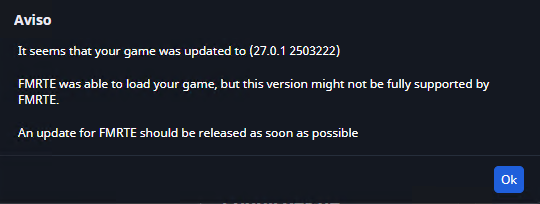
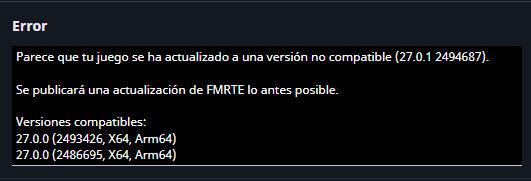
  • Support for Game update (27.0.1 2503222)
  • Loan Contract - loan-to-buy fee: optional, mandatory or after a number of matches
  • Loan Contract - future fees and clauses for a loan-to-buy
  • Loan Contract - unused wage
  • Future Transfers - edit the fees and clauses set in Move to Club

Changed

  • Loan Contract - laid out like Move to Club, cards fold and show a * for unsaved edits
  • Loan Contract - buy back fee is now set in Future Additional Clauses
  • Future Transfers - details under the list, filters on the right

Fixed

  • Future Transfers - contract start date going back after changing the transfer date

Build 11

Fixed

  • Grids - FMRTE closing when sorting by some columns, such as Loaned To Team

Build 10

Added

  • Support for Console Edition (27.0.1 2494983)

Build 9

Added

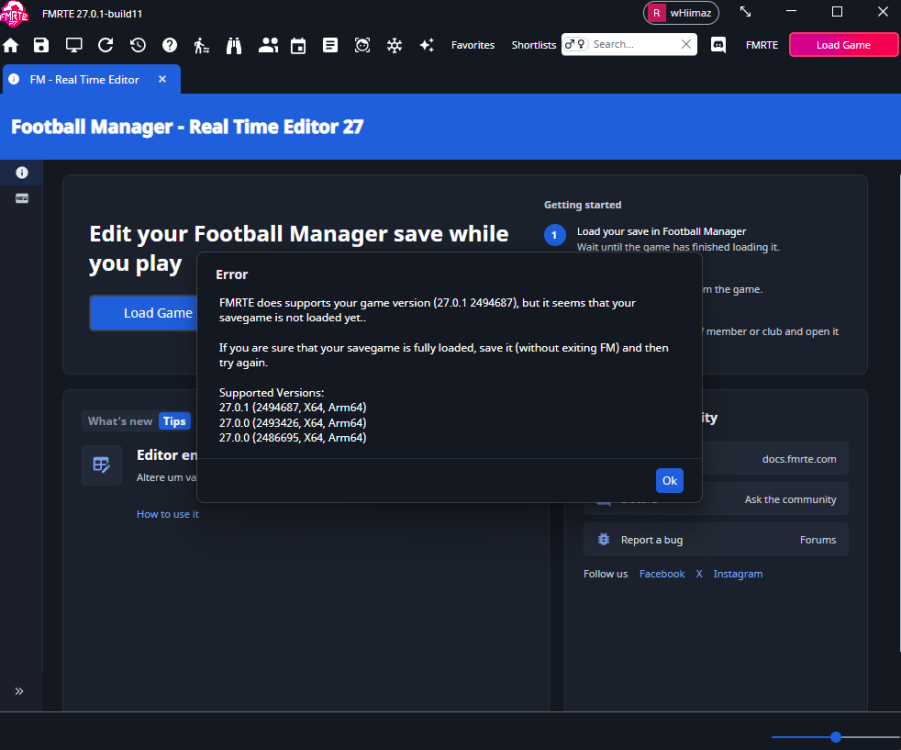
  • Support for Game update (27.0.1 2494687)
  • Move to Club - loan unused wage percentage and unused monthly fee
  • Move to Club - mandatory loan-to-buy fee
  • Move to Club - future fees and clauses for a loan-to-buy
  • Club squad list - Filter not at club hides players who are out on loan
  • Club squad list - names of loaned-in players in blue, loaned-out players in red

Fixed

  • Grids - contract Started column showing the time as well as the date
  • Move to Club - fee transfers not changing either club’s transfer budget
  • Move to Club - loan buy back fee lost when the loan club bought the player
  • Move to Club - values typed for the last move left in the form

Build 8

Added

  • Header pills - hide or show each one in Settings or by right-clicking the header
  • Loan Rules - edit a nation’s loan limits on its Transfer Rules tab
  • Staff - show and edit the Joined Club and Signed dates on staff contracts

Changed

  • Settings - header image options moved to Appearance > Header
  • Transfer Rules - cards fold, showing a summary and a * for unsaved edits
  • Transfer Rules - rules not kept in the save show an “Until reload” tag
  • Human Manager - Move to Club now sends a job offer instead of moving the manager directly

Fixed

  • Tactical Understanding - Match Exposure not staying at 100 after Max when the tactic was changed
  • Human Manager - freeze button not working

Build 7

Added

  • Tactical Understanding for national teams
  • Added toggle to show players potential attributes
  • Added training contribution to tactical understanding page
  • Move to Club - Tomorrow button for the transfer date
  • Youth intake - shows when the candidates appear and when they join your club

Changed

  • Arranging a transfer now opens the player’s Future Transfers tab
  • Move to with fee now pre-fills the amount with the current asking price

Fixed

  • Match ticket price - edits now apply to cup and European games and last into the next season

Build 6

Added

  • Settings - changes now apply right away
  • Save button - shows how many changes are not saved yet
  • Team Cohesion on the Tactical Understanding page, with its own Max button
  • Tactical Understanding - new page layout, showing your tactics
  • Human Manager - move to another club or national team (experimental feature)
  • Rename players and staff to any name
  • Ability to view and edit your club’s upcoming youth intake

Fixed

  • Maximize Tactical Understanding
  • Renaming a person - game crashing later, or the name changing after a reload
  • Edited players positions reverting after some time
  • Move to club (including loan) - “Unable to create a new contract” error
  • Fixed dates not saving on some regional settings

Build 5

Added

  • Support for Game update (27.0.0 2493426)

Build 4

Added

  • Ability to view and edit club wage contributions
  • Nation data grid columns: men’s and women’s (Importance, FIFA Position, Youth Rating…)
  • Ability to import players from legacy .pxml files
  • Competition rules: edit outfield, non-EU and squad salary limits (where the competition has them)
  • Competition rules: edit max squad size in some more competitions (Ligue 1, European League…)
  • Competition rules: edit MLS reserve players limit
  • Club finances: edit maximum squad salary (Spanish clubs only)
  • Transfer players like the game: arrange a move with a fee, a date and terms
  • Player loan contract buy back fee, purchase after matches and the parent club cup clause

Fixed

  • Club finances - income statements not showing any values
  • Nation transfer preferences - changes only saved on the first row
  • Manager profile - columns pushed off the screen at some display scales
  • Recommended CA - now much closer to the player’s actual current ability
  • AI Assistant: chats locking up on local models after the tool limit
  • AI Assistant: local server errors now show the server’s own message
  • AI Assistant: Claude follow-up messages failing with HTTP 400
  • AI Assistant: Claude chats now use prompt caching to lower costs

Build 3

Added

  • Ability to edit cities
  • Role Weights settings (Settings > Ratings)
  • Advanced Search: ethnicity filter
  • Tactics: role ratings on the cards, selection score on hover
  • Tactics: choose the selection criteria
  • Ability to edit awards
  • AI Assistant: response timeout per provider (Settings > AI Assistant > Advanced)

Fixed

  • Copying grid rows (CTRL+C)
  • Attribute colours not matching the game
  • Ability Weights columns cut off in small windows
  • AI Assistant: Gemini 3 models failing with HTTP 400
  • AI Assistant: provider errors now show the provider’s own message

Build 2

Fixed

  • Saves with more than 1 million persons failing to load
  • Empty contract columns (expiry date, signed date, transfer status…) in squad, staff and search lists

Build 1

Added

  • Support for FM 27.0.0 preview game version
  • Quick search overlay (CTRL+F) with history, previews and natural-language queries
  • Reworked Advanced Search, Mass Edit, Preset Manager and Freezer dialogs
  • Compact entity header with faces and logos
  • Edit history with undo, edited/saved field marks and unsaved-changes prompts
  • Player role ratings using the game’s formula, with best role
  • Actual and Potential ratings combine the best role rating with CA/PA
  • Read-only player statistics with league comparisons
  • Player promises (list, add, edit and remove)
  • Player work permits (add, edit and remove)
  • Player long-term future job
  • Players ethnicity (edit and mass edit)
  • Player-coach staff details on the player page
  • Clone Center
  • Clubs Tactics tab from the team’s own tactic
  • Edit formation positions on Team Selection
  • Nations Tactics tab using Team Selection
  • Nation Transfer Rules and Competition Rules tabs (experimental)
  • Edit competitions squad registration limits
  • Presets: Match preparation and All-in-one squad screen
  • Presets: set or remove a spoken language
  • Presets: set or remove release clauses
  • Save a Mass Edit tab as a preset
  • Advanced Search filters by continent, region and city of birth
  • Advanced Search filters clubs by total debt and monthly debt repayments
  • Data grid columns: Body Type, Nationality Info, Joined Club, Gender and non-EU in Italy
  • Data grid column picker, with column order, width and sort kept across restarts
  • Shift+click on a column header adds a secondary sort
  • Improved current screen
  • Person full name and shirt name
  • Settings page with search
  • AI Assistant (experimental)

Fixed

  • Some UI issues
  • Lost data grid selection and scroll position when changing tabs
  • Lost club edits when moving between team and finances
  • Swapping staff not moving scouting assignments
  • Main window not fitting the screen
  • Import players not updating the view
  • Game rating colors

How to Enable Experimental features

  • Go to FMRTE Settings
  • Check the ‘Enable Experimental Features’ checkbox
  • Press the Save button

Supported Versions Steam/Epic Store

  • Football Manager 2026 - 27.1.0 (2505117)
  • Football Manager 2026 - 27.0.1 (2494687, 2503222)
  • Football Manager 2026 - 27.0.0 (2486695, 2493426)

Supported Versions Microsoft Store

  • Football Manager 2026 - 27.1.0 (2505117)
  • Football Manager 2026 - 27.0.1 (2494687)
  • Football Manager 2026 - 27.0.0 (2486695, 2493426)

Supported Versions Console Edition

  • Football Manager 2026 - 27.1.0 (2506668)
  • Football Manager 2026 - 27.0.1 (2494983)

File Information

Submitter BraCa

Submitted 10/30/26

Category Football Manager 27

View File

FMRTE 27 for Windows

  • Replies 90
  • Views 5.2k
  • Created
  • Last Reply

Top Posters In This Topic

Most Popular Posts

  • FMRTE 27.0.0 (build 3) - Released Download: FMRTE Auto-update or https://www.fmrte.com/download/fmrte27 Added Ability to edit cities Role Weights settings (Settings > Ratings) Advanced Search: et

  • Hi, will there be an update today, given that a game update has already been released?

  • Not being rude but as stated in the post above yours...

Posted Images

Featured Replies

Hey @BraCa amazing work once again.And very fast as always.

I have 3 things to ask :

  1. I see that % has changed.For example Olise was close to 80% like Haaland and Mbappe and now all of them are over 90%.I see that in every player. How can we calculate it now how efficient a player is?

  2. I usually change my squad % by 0.5-1% maximum to keep the game as realistic as possible.With the new % system,how much is 0.5% difference now?

  3. There are excellent attribute colours for number 14 also,not only 15+,is there away to change that and make them like ingame that changes colour only from 15 and up?

    Thank you very much once more.Loving it since many many years now.

  • Author
1 hour ago, EmperorFM said:

Hey @BraCa amazing work once again.And very fast as always.

I have 3 things to ask :

  1. I see that % has changed.For example Olise was close to 80% like Haaland and Mbappe and now all of them are over 90%.I see that in every player. How can we calculate it now how efficient a player is?

  2. I usually change my squad % by 0.5-1% maximum to keep the game as realistic as possible.With the new % system,how much is 0.5% difference now?

  3. There are excellent attribute colours for number 14 also,not only 15+,is there away to change that and make them like ingame that changes colour only from 15 and up?

    Thank you very much once more.Loving it since many many years now.

Hi! Yes, the ratings work differently in this version, so you can’t really compare the new numbers with the old ones.

The rating is now made of two parts that count the same:

  1. The player’s best role. FMRTE rates the player in every role using the same formula the game uses and picks the best one. Only positions the player can actually play count, and playing out of position lowers the score like it does in the game.

  2. The player’s Current Ability (CA), which is how good the game itself thinks the player is.

Before, the rating only looked at attributes, with our own weights per position, and it didn’t care if the player could actually play there.

That’s why Olise, Haaland and Mbappé are now over 90%. Their CA is very high, so that part is close to the max for them. The order between players still makes sense, it’s just a new scale. If one of the two parts is low, the rating drops quite a bit. For example, an older player who lost pace can still fit a playmaker role well, but the lower CA keeps the rating realistic.

To judge a player I’d use:

  • Actual Rating to compare players overall

  • The Role Ratings tab to see how well a player fits a specific role in your tactic

  • CA if you want the game’s own number without anything from FMRTE

About your 0.5% question, roughly:

  • +1 on one key attribute for the player’s role is around +0.3 to +0.45%

  • +2 CA is around +0.5%

So if you used to allow 0.5 to 1%, keeping changes around 0.5% now should feel about the same and keep things realistic.

image.png

Sorry, I'm not sure if this is the right section to post in, or whether what I'm about to report is a feature or a bug.
In FMRTE 27, when I select rows like this and press Ctrl+C, it doesn't copy the entire row to the clipboard as it did in previous versions. Now I can only copy the Name or ID from the right-click menu.
I really like this feature and hope you can bring it back. Thanks~

  • Author
Just now, AlessioQ said:

image.png

Sorry, I'm not sure if this is the right section to post in, or whether what I'm about to report is a feature or a bug.
In FMRTE 27, when I select rows like this and press Ctrl+C, it doesn't copy the entire row to the clipboard as it did in previous versions. Now I can only copy the Name or ID from the right-click menu.
I really like this feature and hope you can bring it back. Thanks~

Yep, that feature is missing, will be added on the next update, later today or tomorrow

As always thank you Braca (and everyone contributing) for the fast release !

I hate FM26 and am still playing FM24 with a lot of tweaks and mods, but this FM27 is what, I think, FM26 should have been !

Again ty Braca and have fun FMRTE users ! 😉

Englisn isn't your first language

What is your exact FM version:FMART 27.0.0-build2

Windows 11

Are you running FMRTE as administrator-  Yes

Do you have a current license for the version of FMRTE you are using - Yes

Hi,

I'm using FMRTE 27.0.0-build2.

I have two issues:

1. Ratings / Ability Weights not working
I changed the Ability Weights in Settings → Ratings, but the Actual Rating and Potential Rating in the search results do not update at all. The new weights seem to have no effect.
image.png
image.png

2. Cannot copy search results to Excel
In previous versions of FMRTE, I could select all rows (Ctrl+A) in the search results and copy-paste them into Excel. In FMRTE 27 this no longer works. I cannot select multiple rows and copy them properly.

I have attached screenshots showing the Ratings settings and the search results page.

Is this a known bug in the early builds, or am I missing something?
image.png


Thank you.

2 hours ago, BraCa said:

嗨!是的,这个版本的评分机制不同,所以你无法真正比较新数据和旧数据。

评级现由两个同等部分组成:

  1. 玩家的最佳定位。FMRTE在每个位置都用游戏用的相同公式评分,并选出最佳角色。只有玩家能打的位置才算数,打错位置会像游戏一样降低分数。

  2. 玩家当前能力(CA),也就是游戏本身认为玩家的水平。

以前,评级只看属性,并根据每个位置的权重,并不关心球员是否能在那里上场。

这就是为什么奥利塞、哈兰德和姆巴佩现在的胜率超过90%。他们的CA很高,所以这部分对他们来说接近最大值。玩家之间的顺序依然合理,只是换了一个新的尺度。如果其中一个部分较低,评级会大幅下降。例如,年长球员失去速度后仍能很好地胜任组织者角色,但较低的CA保持了评分的真实性。

评判一名球员时,我会用:

  • 实际评分用于整体比较球员

  • 角色评级标签,用来查看球员在你战术中特定角色的适应程度

  • 如果你想要游戏本身的号码,且没有FMRTE的相关信息,可以去加州

关于你问的0.5%,大致如下:

  • 玩家角色在一个关键属性上的+1大约是+0.3到+0.45%

  • +2 CA约为+0.5%

所以如果你以前允许0.5%到1%,现在保持在0.5%左右的变动应该差不多,保持现实。

Hi @BraCa

Thank you for the fast updates and all the hard work on FMRTE 27. I really appreciate it.

About the new rating system: after reading your explanation, I understand that Actual/Potential Rating is now a combination of best role rating + CA.

From many attribute tests (including long-term match simulations), CA itself has very little correlation with actual win rate. What really matters for performance is the specific attributes. Because of this, the new system currently makes the rating feature almost unusable for me when trying to find players based on attribute strength.

Would it be possible to add an option for the CA weight in the rating calculation?
If we could set the CA weight to 0, it would allow the rating to work more like the previous versions (purely based on attributes/role fit). That would be extremely helpful for users who rely on attribute-based scouting.

I’m not a native English speaker, so if anything sounds rude or unclear, please know that is not my intention at all. I just wanted to explain the issue carefully.

Thank you again for considering this.

Hi @BraCa
Incredible work. Great to finally see that ratings are now dependent on position.
I was curious where the attributes chosen for player roles "lower is better" eg Passing for a NCB (IP) are taken from? Is it possible to edit these attribute choices?
Also, with the introduction of stats, could we get form (and maybe training rating) as a numerical value as a possible stat in the squad columns? since the game UI only has the bars on the squad screen and print screen is no longer a thing. I love an excel spreadshit with the data.
Thanks for all your help!

Edited by morrisb88
Wasn't clear the first time round

  • Author
40 minutes ago, 唐伟杰 said:

Hi @BraCa

Thank you for the fast updates and all the hard work on FMRTE 27. I really appreciate it.

About the new rating system: after reading your explanation, I understand that Actual/Potential Rating is now a combination of best role rating + CA.

From many attribute tests (including long-term match simulations), CA itself has very little correlation with actual win rate. What really matters for performance is the specific attributes. Because of this, the new system currently makes the rating feature almost unusable for me when trying to find players based on attribute strength.

Would it be possible to add an option for the CA weight in the rating calculation?
If we could set the CA weight to 0, it would allow the rating to work more like the previous versions (purely based on attributes/role fit). That would be extremely helpful for users who rely on attribute-based scouting.

I’m not a native English speaker, so if anything sounds rude or unclear, please know that is not my intention at all. I just wanted to explain the issue carefully.

Thank you again for considering this.

Yes, I'll make it configurable

braca.png Is it possible to add an option to transfer to another club when right-clicking within one's own club?

3 minutes ago, Ote11 said:

braca.png Is it possible to add an option to transfer to another club when right-clicking within one's own club?

Hi

I dont think so

I am testing at the moment other issues

you can select a player and use the swap player/move to club tab

read this

for more info-

No image preview

Getting started with FMRTE 27 | FMRTE Documentation

FMRTE lets you search and edit the savegame currently running in Football Manager. Browsing and searching are free. Saving edits requires an activated license.

Hey, @BraCa , thanks for another FMRTE!

It's been working well for me so far, but I wondered if there are any plans to move staff to your/other clubs without using the "swap" feature? I think it's pretty much the only thing the official in-game editor has over your work.

  • Author

FMRTE 27.0.0 (build 3) - Released

Download: FMRTE Auto-update or https://www.fmrte.com/download/fmrte27

Added

  • Ability to edit cities

  • Role Weights settings (Settings > Ratings)

  • Advanced Search: ethnicity filter

  • Tactics: role ratings on the cards, selection score on hover

  • Tactics: choose the selection criteria

  • Ability to edit awards

  • AI Assistant: response timeout per provider (Settings > AI Assistant > Advanced)

Fixed

  • Copying grid rows (CTRL+C)

  • Attribute colours not matching the game

  • Ability Weights columns cut off in small windows

  • AI Assistant: Gemini 3 models failing with HTTP 400

  • AI Assistant: provider errors now show the provider’s own message

7 hours ago, Bayu Nugraha said:

is there any "in game hack speed"? loading so slow in fm 27* --> if possible any way, thank you👍

What do you mean? FMRTE being slow or FM27?

Random question. I remember there used to be an issue on old FMRTEs where, if you changed a player's name, it changed the name of every player with that name. That's no longer the case?

1 hour ago, Bestie said:

Question comme ça. Je me souviens qu'il y avait un bug dans les anciennes versions de FMRTE : si on changeait le nom d'un joueur, ça changeait aussi le nom de tous les joueurs portant ce nom. Ce n'est plus le cas ?

Works fine

Join the conversation

You can post now and register later. If you have an account, sign in now to post with your account.
Note: Your post will require moderator approval before it will be visible.

Guest
Reply to this topic...

Account

Navigation

Search

Search

Configure browser push notifications

Chrome (Android)
  1. Tap the lock icon next to the address bar.
  2. Tap Permissions → Notifications.
  3. Adjust your preference.
Chrome (Desktop)
  1. Click the padlock icon in the address bar.
  2. Select Site settings.
  3. Find Notifications and adjust your preference.