[FAQs]- Editor How To Guide -Advanced Rule editing
- Replies 53
- Views 159.1k
- Created
- Last Reply
Top Posters In This Topic
-
culturedleftfoot 53 posts

Most Popular Posts
-
[32]Italy Non EU player rules Many users start a save and are unaware of this rule so you can use FMRTE to add a second nationality to a player etc but it wont change th
-
Change Squad size International Competitions This is very straightforward😉 Once you have opened the competition/s in advanced rules you need to select Players tab
-
[1]How to access Advanced RulesThis is just a quick reminder how to access the ADVANCED RULES[ AR] for a Nation and then the competitions that are pre-loaded into the game relating to that nationYou n
Posted Images
Featured Replies

This topic is now closed to further replies.
This thread will serve as a reference point for FAQs and explanations on how to do things in the Pre Game Editor using basic and advanced rules.
I will try to update it[time constraints allowing] and keep this opening post as a Menu to the covered points- some are easy things and some may be complicated depending on your knowledge of the Editor
LIST OF TOPICS COVERED
[1]How to access Advanced Rules here
[2]How do I change the number of Substitutes here
[3]change the squad registration allocation here
[4]How to remove Brexit here
[5] Removing errors-wrong number of teams in a competition here
[6]General editing Tip here
[7A]How to view continental/international rules Quick method here
[7B]How to view continental/international rules Quick method here
[8]
How to view continental/international rule longer method[using notepad]removed[9]Match Day Rules rather than Overall Squad Rules- Continental Comps here
[10]EDITING/REMOVING WAGE CAPS here
[11]Changing substitute numbers here
[12]Homegrown transfers-more than foreign signings-some tips here
[13]Change KO times here
[14]How to change dual Nationality for newgens/regens here
[15]How to Ban Clubs from Continental Competitions here
[16]Creating a Super League here
[17]
Template to use for European club rule editing FM21removed[18]How to bypass verification here
[19]CHECK FOR EXTRA SETS OF RULES here
[20]Issues with the editor not working correctly[options missing/displaying correctly etc] changes in files not showing in game etc. here
[21]Changing away goals rules in UEFA comps here
[22]How to keep teams apart from the same group in knockout round here
[23]Issues with game not loading XML files- stating they need verification. here
[24]Why cant I use certain squad numbers for GK/outfield players here
[25]Error/Bug - No Squad selected for a specific date when trying to verify a file in advanced rules here
[26]Points Deduction to a team/s here
[27]Fixture rules/squad selection rules FM22 here
[28] Remember for continental/International files to make sure all competitions are entered correctly here
[29] FFP and continental rules here
[30]When there is an update to the game DB here
[31]How to change the age of players to play in senior matches here
[32]Italian Non EU Player rules here
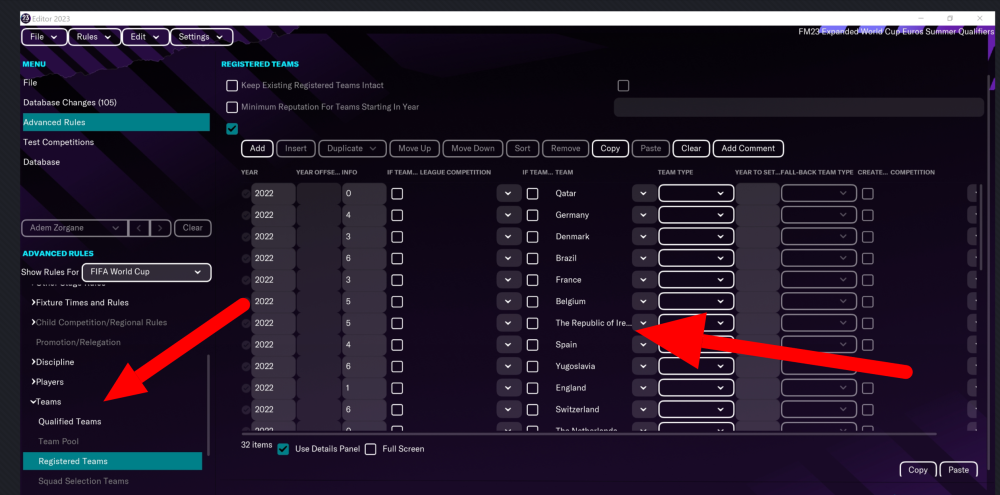
[33] Change Squad size International Competitions here
[34] Change Nation/s in 2022 World Cup here
[35] Real fixtures and results error FM24.3 FIX here
[36]How to remove rules stopping players who have played x amount of games for another club being eligible to play here