[1]What is your exact FM version:(example answer- FM 18.1.2 (Game Build 1051982) You can find the exact game build by selecting Game status while game is running
or in steam [To access this-in steam library right click on the game-select properties-updates it will show the exact build you are using]
FM27.0.0 Windows
[2]What is your exact FMRTE version:(example answer- FMRTE18.1.4[build 4])
FMRTE 27.0.0 build 3
[3]Are you running FMRTE as administrator- state Yes/No [This is suggested/ important as most issues are caused by not running the App correctly-RIGHT CLICK ON App Run as administrator]
YES
[4]Do you have a current license for the version of FMRTE you are using and where did you buy the code from.
YES From FMRTE.com
Playable nation
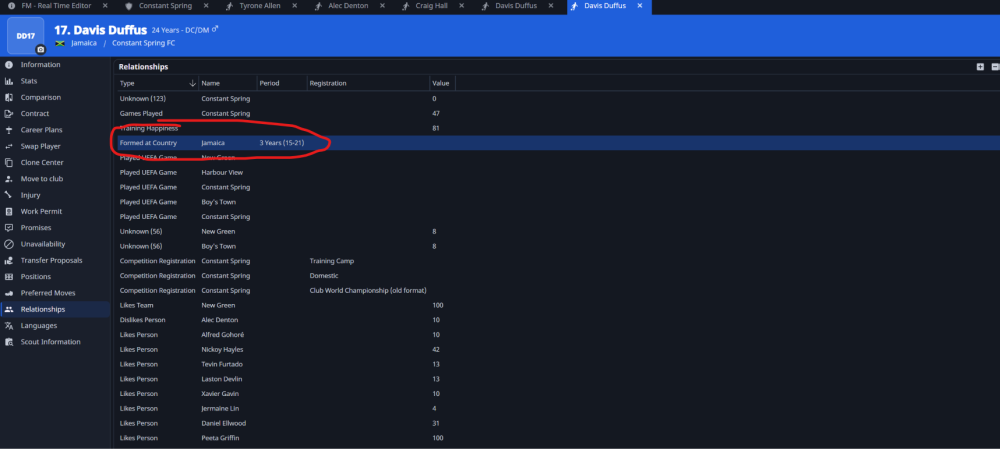
I press Trained at nation player preset on the club screen
It shows up in relationships and I press save and simulation a few days
You can post now and register later.
If you have an account, sign in now to post with your account.
Note: Your post will require moderator approval before it will be visible.
[1]What is your exact FM version:(example answer- FM 18.1.2 (Game Build 1051982) You can find the exact game build by selecting Game status while game is running
or in steam [To access this-in steam library right click on the game-select properties-updates it will show the exact build you are using]
FM27.0.0 Windows
[2]What is your exact FMRTE version:(example answer- FMRTE18.1.4[build 4])
FMRTE 27.0.0 build 3
[3]Are you running FMRTE as administrator- state Yes/No [This is suggested/ important as most issues are caused by not running the App correctly-RIGHT CLICK ON App Run as administrator]
YES
[4]Do you have a current license for the version of FMRTE you are using and where did you buy the code from.
YES From FMRTE.com
Playable nation
I press Trained at nation player preset on the club screen
It shows up in relationships and I press save and simulation a few days
Eligibility never changes