I'm testing the new AI Assistant on FM 27 using qwen3.5-9b on LM Studio as the provider but it's constantly giving the error "The assistant reached the limit of eight tool rounds. Send another message to continue." and then locking out the conversation. As far as I know it's a problem with the AI model itself and not FMRTE, but maybe it can be fixed? Not sure.
Anyway, mostly just making this post to ask if anyone has any local models they recommend for the assistant that actually work well (and fast)?
+Context, here's the error output in LM Studio when the tool round limit is reached in a chat
[2026-10-31 07:19:04][ERROR][qwen/qwen3.5-9b] Engine protocol predict request returned 500: {"error":{"code":500,"message":"\n------------\nWhile executing CallExpression at line 85, column 32 in source:\n...first %}↵ {{- raise_exception('System message must be at the beginnin...\n ^\nError: Jinja Exception: System message must be at the beginning.","type":"server_error"}}. Error Data: {
"status": 500,
"responseBody": {
"error": {
"code": 500,
"message": "\n------------\nWhile executing CallExpression at line 85, column 32 in source:\n...first %}↵ {{- raise_exception('System message must be at the beginnin...\n ^\nError: Jinja Exception: System message must be at the beginning.",
You can post now and register later.
If you have an account, sign in now to post with your account.
Note: Your post will require moderator approval before it will be visible.
I'm testing the new AI Assistant on FM 27 using qwen3.5-9b on LM Studio as the provider but it's constantly giving the error "The assistant reached the limit of eight tool rounds. Send another message to continue." and then locking out the conversation.
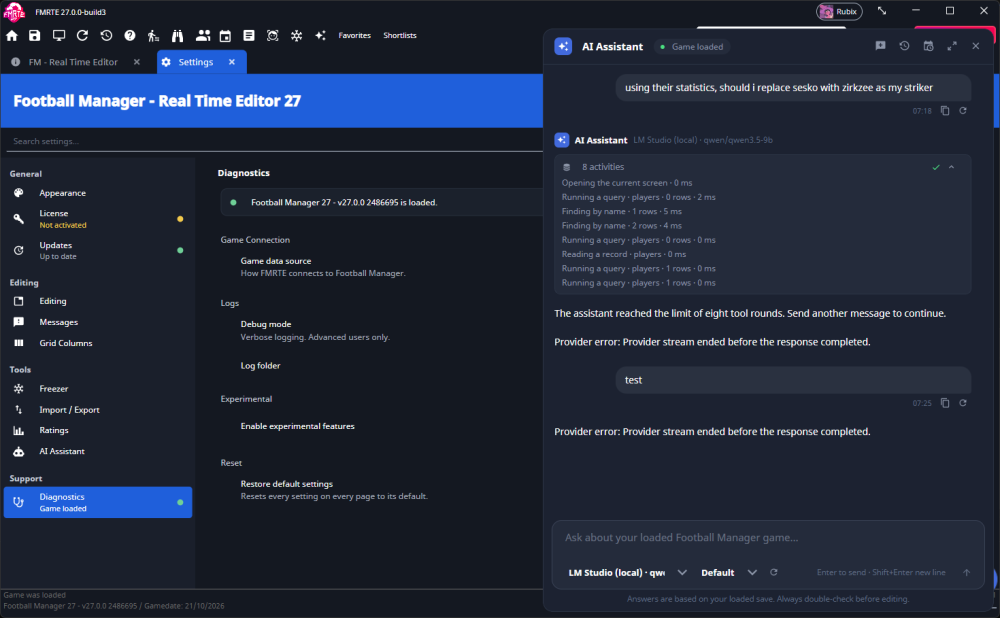
As far as I know it's a problem with the AI model itself and not FMRTE, but maybe it can be fixed? Not sure.
Anyway, mostly just making this post to ask if anyone has any local models they recommend for the assistant that actually work well (and fast)?
+Context, here's the error output in LM Studio when the tool round limit is reached in a chat
[2026-10-31 07:19:04][ERROR][qwen/qwen3.5-9b] Engine protocol predict request returned 500: {"error":{"code":500,"message":"\n------------\nWhile executing CallExpression at line 85, column 32 in source:\n...first %}↵ {{- raise_exception('System message must be at the beginnin...\n ^\nError: Jinja Exception: System message must be at the beginning.","type":"server_error"}}. Error Data: {
"status": 500,
"responseBody": {
"error": {
"code": 500,
"message": "\n------------\nWhile executing CallExpression at line 85, column 32 in source:\n...first %}↵ {{- raise_exception('System message must be at the beginnin...\n ^\nError: Jinja Exception: System message must be at the beginning.",
"type": "server_error"
}
}
}, Additional Data: n/a